.jpg
JPG file: what it is and how to convert it
A .jpg (or .jpeg) file is a photo compressed with the JPEG standard: the format nearly every camera, phone and website uses, and every program opens.
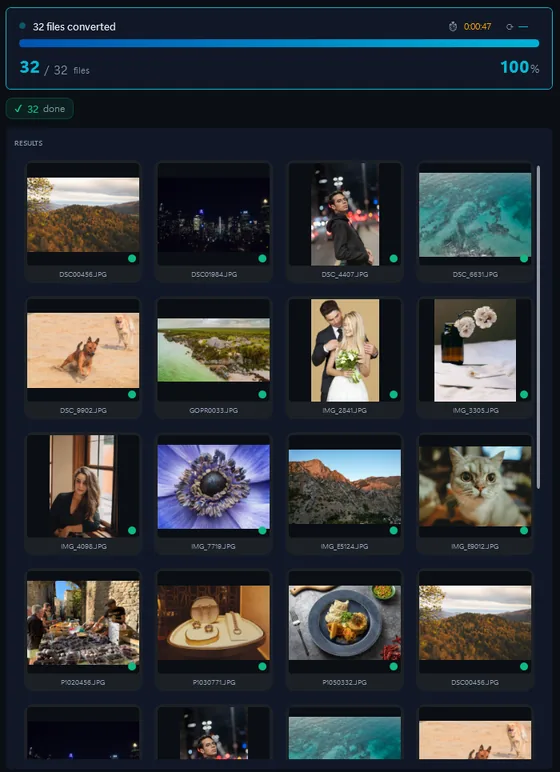
- Add your JPG filesDrop in single files or a whole folder.
- Pick output formatJPG, PNG, TIFF, PDF and more.
- Click ConvertEvery file converted in one pass.
People convert JPG when they need transparency (PNG), a lossless master (TIFF), a document (PDF) or smaller web files (WEBP), or when a folder of thousands has to be resized or renamed. Contenta Converter does that on Windows in one batch.
How to open a .JPG file on Windows
- Windows Photos or any browser (free). Double-click: JPG opens everywhere. For a single file, Paint saves it as PNG, BMP or TIFF.
- IrfanView or XnView (free). Open, rotate and save one JPG at a time, with control over the quality setting.
- Contenta Converter, for folders. Drop the folder, pick PNG, TIFF, PDF, WEBP or a smaller JPG, then resize, rename, watermark or add copyright in the same pass. The EXIF date and camera data are carried over.
Before you convert JPG files
- What changes in the conversion
JPG is lossy: every time a JPG is saved as JPG again, the pixels are compressed once more and fine detail degrades a little. Converting a JPG to PNG or TIFF loses nothing, but the file grows several times over, and it does not bring back what the first compression removed. JPG has no transparency, so a JPG converted to PNG is still opaque. - What Contenta Converter does with JPG
Contenta Converter writes JPG at a quality you choose and keeps the EXIF date, camera, GPS and copyright fields when converting to JPG, TIFF, PNG or WEBP. The EXIF orientation is applied, so the output stands upright. It converts the photo you give it: it does not repair compression artefacts, and it writes 8-bit JPG, as the standard requires.
The same photo, five outputs
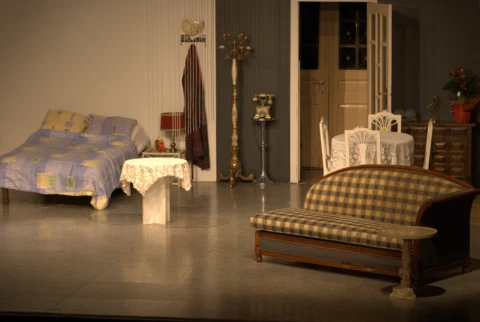 DSC_0001.NEF · 3900×2613
- PNG.png1.9 s16.1 MB
- AVIF.avif2.2 s2.02 MB
- JPG.jpg1.7 s1.69 MB
- WebP.webp1.7 s1.32 MB
- JPEG XL.jxl1.7 s1.12 MB
Formátum |
JPG |
Társaság |
Joint Photographic Experts Group |
| Leírás | Szinte az összes digitális fényképezőgép rendelkezik a lehetőséget, hogy mentse a képeket JPEG formátumban. A JPEG formátumot támogat 8 bit színes (vörös, zöld és kék) és összességében viszonylag kis fájlméret. A tömörítés, ha nem túl súlyos, nem befolyásolja jelentősen a képet. De JPEG fájlok szenvednek generációk lebomlás során többször edited és mentett. Fényképészet képek jobban meg lehet tárolni, nem veszteségmentes JPEG formátumban, ha majd újra változott a jövő, vagy ha a kis mesterséges kifejezés elfogadhatatlan. Ezt azonban a legjobb formában az interneten való közzététele a legtöbb esetben. |
| Előnyök | kis fájlméret, nagy népszerűségnek |
| Hátrányai | veszteség a minőségi |
| Metaadatok | Handles XMP, IPTC és EXIF |
Ready to convert your JPG files? Download the free trial.
Download the free trial: every file converts, keep 10 cleanTestimonials:
"In need to convert these pictures today it has been a relief to find your software. Thanks!"Jason Hoffman, CA
"I shoot RAWs every day and I love your converter. This really saves time."
Jim Richardson, Indianapolis
"I have to say that I've been looking at photo converters and yours is clean, simple, and awfully good."
Brandon Keegan, NY
Satisfaction Guaranteed:
 | Professional photo conversion and processing as easy as it should be |
|
| Trusted by photographers, designers, and businesses worldwide. |
|
| Totally risk free. After purchase, you have a 30-day money back guarantee. No questions asked. |
JPG image organization
JPG image color processing
JPG image processing
JPG image annotation
Frequently Asked Questions about JPG
Is JPG the same as JPEG?
Yes, they are identical. The only difference is the file extension: .jpg uses three characters (a requirement of older Windows systems), while .jpeg uses the full name. Both refer to the same JPEG compression standard (Joint Photographic Experts Group).
When should I use PNG instead of JPG?
Use PNG when you need transparency, sharp text/line art, or lossless quality (screenshots, logos, diagrams). Use JPG for photographs and complex images where small file size matters more than pixel-perfect accuracy.
Does converting JPG to JPG lose quality?
Each re-encode compresses the pixels again. At quality 90 or higher the change is hard to see after one pass, but it adds up over many saves. For a copy you will edit again, convert to PNG or TIFF; make a new JPG only for the final, smaller version.
Does the EXIF data survive the conversion?
Yes, when the output format can hold it. Contenta Converter copies the date, camera, lens, GPS and copyright fields into JPG, TIFF, PNG and WEBP outputs. It can also strip them on request, which is what you want before posting photos publicly.
Need more than JPG conversion? Browse supported cameras that produce JPG files below, or: