.jpg
JPG file: what it is and how to convert it
A .jpg (or .jpeg) file is a photo compressed with the JPEG standard: the format nearly every camera, phone and website uses, and every program opens.
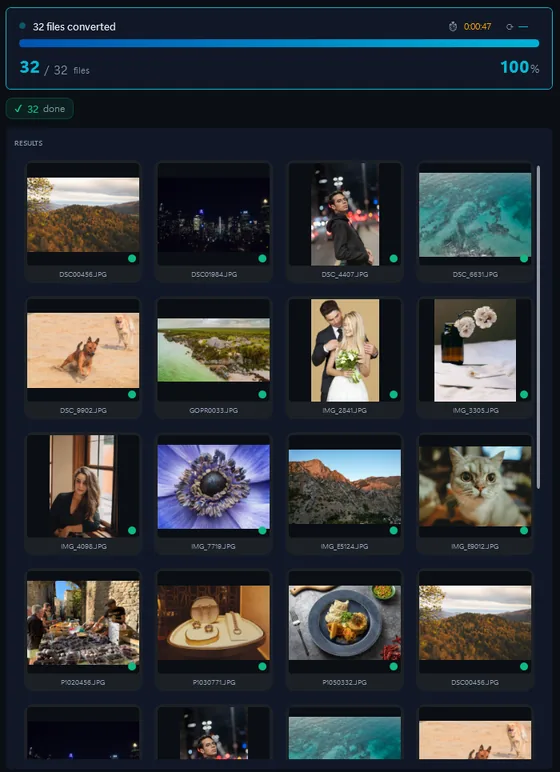
- Add your JPG filesDrop in single files or a whole folder.
- Pick output formatJPG, PNG, TIFF, PDF and more.
- Click ConvertEvery file converted in one pass.
People convert JPG when they need transparency (PNG), a lossless master (TIFF), a document (PDF) or smaller web files (WEBP), or when a folder of thousands has to be resized or renamed. Contenta Converter does that on Windows in one batch.
How to open a .JPG file on Windows
- Windows Photos or any browser (free). Double-click: JPG opens everywhere. For a single file, Paint saves it as PNG, BMP or TIFF.
- IrfanView or XnView (free). Open, rotate and save one JPG at a time, with control over the quality setting.
- Contenta Converter, for folders. Drop the folder, pick PNG, TIFF, PDF, WEBP or a smaller JPG, then resize, rename, watermark or add copyright in the same pass. The EXIF date and camera data are carried over.
Before you convert JPG files
- What changes in the conversion
JPG is lossy: every time a JPG is saved as JPG again, the pixels are compressed once more and fine detail degrades a little. Converting a JPG to PNG or TIFF loses nothing, but the file grows several times over, and it does not bring back what the first compression removed. JPG has no transparency, so a JPG converted to PNG is still opaque. - What Contenta Converter does with JPG
Contenta Converter writes JPG at a quality you choose and keeps the EXIF date, camera, GPS and copyright fields when converting to JPG, TIFF, PNG or WEBP. The EXIF orientation is applied, so the output stands upright. It converts the photo you give it: it does not repair compression artefacts, and it writes 8-bit JPG, as the standard requires.
The same photo, five outputs
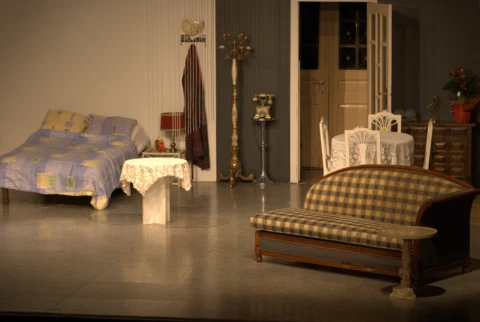 DSC_0001.NEF · 3900×2613
- PNG.png1.9 s16.1 MB
- AVIF.avif2.2 s2.02 MB
- JPG.jpg1.7 s1.69 MB
- WebP.webp1.7 s1.32 MB
- JPEG XL.jxl1.7 s1.12 MB
포맷 |
JPG |
회사 |
Joint Photographic Experts Group |
| 설명 | 거의 모든 디지털 카메라는 JPEG 형식으로 이미지를 저장하는 옵션이있다. 당 8 비트를 지원하는 JPEG 형식 색상 (빨간색, 녹색 및 파란색)과 상대적으로 작은 파일 크기를 생산하고있다. 압축 간주되지 않는 경우도 눈에 띄게 심한하지 이미지에서.하지만 JPEG 파일을 편집하고 저장한 세대가 반복적으로 저하를 겪을 수있습니다. 사진 이미지를 더 잘 무손실 이외에 저장되어있을 수있습니다 - JPEG 포맷 만약 그들이 다시됩니다 - 미래에, 또는 수정한 경우에는 작은 '유물'의 존재를 받아 들일수 없죠. 그러나 대부분의 경우 인터넷에 게시하기위한 가장 좋은 형식입니다. |
| 장점 | 작은 파일 크기, 높은 인기를 |
| 단점 | 품질 손실 |
| 메타 | 핸들 XMP,의 EXIF 나 IPTC |
Ready to convert your JPG files? Download the free trial.
Download the free trial: every file converts, keep 10 clean증명서:
"귀하의 소프트웨어를 찾을 필요가 안심하고 오늘은이 사진을 변환할 수있습니다. Thanks!"제이슨 호프만, CA
"내가 매일 RAWs 촬영하고 난 당신 변환기를 사랑 해요. 이건 정말 시간을 절약할 수있습니다."
짐 리처드슨, 인디애나 폴리스
"내가 당신 사진을 변환하고, 간단한 청소이며, 몹시 좋은 찾아 다 녔다고합니다."
브랜든 키건, 뉴욕
만족 보장:
 | 프로페셔널 포토 변환 및 작업이 이보다 쉬울 수가 없습니다 |
|
| 사진작가 (아마추어 및 프로페셔널), 디자인 스튜디오, 건축가, 큰 단체 (NASA, IBM, 크라이슬러, 대학 병원들)가 사용함. |
|
| 위험부담이 전혀 없습니다. 구매 후, 30일 이내 환불이 보장됩니다. 특별히 사유를 묻지도 않습니다. |
JPG image organization
JPG image processing
JPG image annotation
Frequently Asked Questions about JPG
Is JPG the same as JPEG?
Yes, they are identical. The only difference is the file extension: .jpg uses three characters (a requirement of older Windows systems), while .jpeg uses the full name. Both refer to the same JPEG compression standard (Joint Photographic Experts Group).
When should I use PNG instead of JPG?
Use PNG when you need transparency, sharp text/line art, or lossless quality (screenshots, logos, diagrams). Use JPG for photographs and complex images where small file size matters more than pixel-perfect accuracy.
Does converting JPG to JPG lose quality?
Each re-encode compresses the pixels again. At quality 90 or higher the change is hard to see after one pass, but it adds up over many saves. For a copy you will edit again, convert to PNG or TIFF; make a new JPG only for the final, smaller version.
Does the EXIF data survive the conversion?
Yes, when the output format can hold it. Contenta Converter copies the date, camera, lens, GPS and copyright fields into JPG, TIFF, PNG and WEBP outputs. It can also strip them on request, which is what you want before posting photos publicly.
Need more than JPG conversion? Browse supported cameras that produce JPG files below, or: