$129 One-Time - The Batch Photo Converter That Replaces Subscriptions
60+ formats. 25+ RAW formats. CLI automation. Everything you need for batch image conversion - without monthly fees.
Trusted by 100,000+ users. 30-day free trial, 30-day money-back guarantee.
Download Free — 30-Day Trial, No Credit CardDownload free. No credit card. No commitment.
Try Free for 30 Days - No Credit Card Required
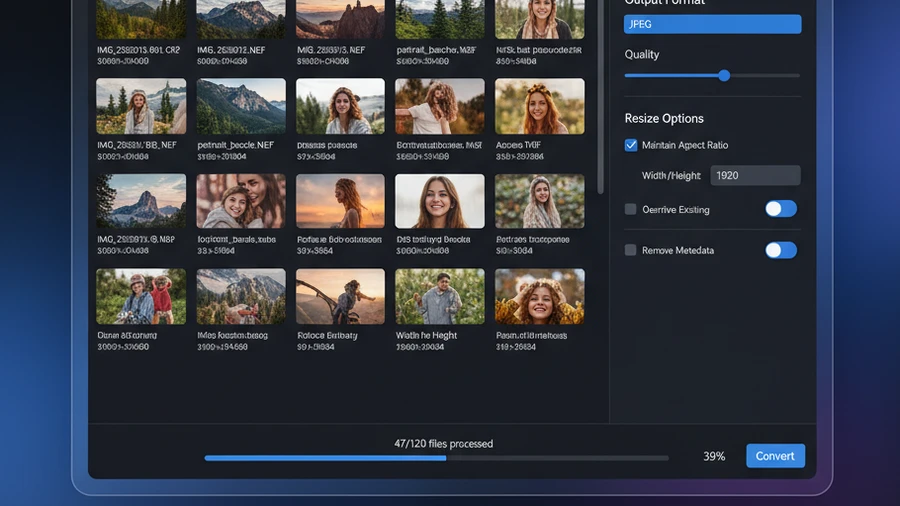
Everything in One Tool
60+ Formats
JPEG, PNG, TIFF, WebP, AVIF, HEIC, PSD, RAW, PDF, SVG, and dozens more.
Batch Processing
Process thousands of images in one operation with multi-core acceleration.
25+ RAW Formats
Canon CR2/CR3, Nikon NEF, Sony ARW, Fuji RAF, DNG, and more.
AI Background Removal
Cut the background out of a whole folder of photos. Each image goes to Google Gemini on your own free API key, so we charge nothing per image.
CLI + MCP Server
Command-line tools. Automate with scripts, CI/CD, or AI agents.
$129 Once
No subscription. No annual renewal. Includes all updates.
Batch convert photos faster: Contenta Converter 9.0.31, measured

Windows · free trial · pay once, no subscription
Narrated in English, with subtitles · Short on time? Watch the one-minute version
How Contenta Compares
| Feature | Contenta | Lightroom | Online Tools | Free Tools |
|---|---|---|---|---|
| Price | $129 once | $10/month | Free (limited) | Free |
| Batch Processing | ✓ | ✓ | ✗ | ✗ |
| RAW Support | ✓ 25+ | ✓ | ✗ | ✗ |
| CLI | ✓ 13 commands | ✗ | ✗ | ✗ |
| Works Offline | ✓ | ✓ | ✗ | ✓ |
| No Upload Required | ✓ | ✓ | ✗ | ✓ |
Before & After
Before Contenta
Pay $10/month for Lightroom. Use online converters with 5MB limits and privacy concerns. Juggle 3 free tools that each handle one format.
After Contenta
One tool. 60+ formats. Batch processing. RAW + AI + CLI. $129 once. Done.
AVIF to JPG & AVIF to PNG — Batch Convert AVIF on Windows
Need to convert AVIF images to a format every app and website accepts? Contenta Converter batch-converts AVIF to JPG and AVIF to PNG in one operation, entirely on your PC.
AVIF to JPG
Convert AVIF to JPG in bulk with full control over quality and resizing. Drop a whole folder of AVIF files and get standard JPG images back in seconds.
AVIF to PNG
Convert AVIF to PNG when you need lossless output or transparency. Batch-process hundreds of AVIF files to PNG without uploading anything online.
100% Offline, No Limits
Everything runs on your Windows PC. No upload size caps, no per-image fees, and your photos never leave your computer.
What is AVIF? AVIF is a modern, highly compressed image format used by newer cameras, browsers, and websites. Because many older apps and editors still can't open AVIF, converting AVIF to JPG or PNG makes your images universally compatible.
Convert AVIF and 60+ other formats. One-time $129, no subscription. Free 30-day trial, no credit card.
TIFF to JPG & TIFF to PNG — Batch TIFF Converter for Windows
Have a folder full of heavy TIFF scans or exports? Contenta Converter is a batch TIFF converter that turns TIFF to JPG, PNG or WebP in one operation, right on your PC — no CR2-style hassle, no uploads.
TIFF to JPG
Convert TIFF to JPEG in bulk with full control over quality and size. Drop a whole folder of TIFF files and get compact, universally compatible JPG images back in seconds.
TIFF to PNG / WebP
Convert TIFF to PNG when you need lossless output or transparency, or to WebP for the smallest web-ready files. The original TIFF source stays untouched.
Batch Folder Processing
Point Contenta at a folder and convert hundreds of TIFF files at once. Recurse through subfolders, rename on output, and keep your folder structure intact.
100% Offline Desktop
Everything runs on your Windows PC. No upload size caps, no per-image fees, and your TIFF files never leave your computer.
Why convert TIFF? TIFF is a high-quality, often uncompressed format used by scanners, microscopes, and print workflows — which makes the files large and slow to share. Converting TIFF to JPG or PNG keeps the image and shrinks it to a format every app, browser, and website accepts.
Convert TIFF and 60+ other formats. One-time $129, no subscription. Free 30-day trial, no credit card.
Start Converting Photos Today
Choose the plan that works for you. All plans include every feature.
No subscription trap. Contenta is a one-time purchase — less than 2 months of Lightroom, and it's yours forever.
Batch Photo Converter — Frequently Asked Questions
Contenta Converter batch converts 60+ formats, including JPG, PNG, WEBP, AVIF, TIFF, HEIC, BMP, GIF and 25+ RAW camera formats (CR2, CR3, NEF, ARW, RAF, RW2, ORF and more) in a single run.
There's no artificial limit — batches are limited only by your disk space and available time. Point it at a folder with thousands of images and let it run.
Yes. By default Contenta Converter writes new output files and never overwrites your originals, so your source photos stay untouched unless you choose otherwise.
Yes. Contenta Converter ships a command-line interface (CLI) and an MCP server, so you can script conversions or trigger them from other tools without the desktop UI.
No. Contenta Converter is a $129 one-time purchase — pay once, own it, and receive free updates. There's no recurring fee.
What Our Users Say
“I have been using Contenta Converter for years and it has saved me countless hours of work. Highly recommended!”
“Simple, fast, and does exactly what it promises. The batch processing is incredibly efficient.”
“Best image converter I have found. The RAW support and metadata handling are top-notch.”
More batch conversion guides
Published by ContentaSoft, Umea, Sweden, developer of Contenta Converter PREMIUM.
Contenta Converter PREMIUM is a desktop application for Windows that batch converts, resizes, renames, watermarks, and processes images in 60+ formats including JPEG, PNG, WebP, HEIC, TIFF, RAW, and PDF.
This software contains no adware, spyware, toolbars, or bundled third-party programs. The installer installs only Contenta Converter PREMIUM.
Conversion, resizing, watermarking and metadata editing run on your computer. The optional AI features (background removal, photo restoration, colorize) send the images you process with them to Google Gemini using your own API key. The software does not collect personal data.
Free 30-day trial with full functionality. After the trial, a license key is required. Lifetime license: $129 (one-time payment, no subscription).
How to Uninstall
Open Windows Settings > Apps > Installed apps, find "Contenta Converter PREMIUM" in the list, and click Uninstall. You can also run the uninstaller from the installation folder or use Control Panel > Programs and Features.
Download size: ~2 MB (web installer). Additional components are downloaded during installation (~300 MB total).