用AI让受损的老照片重焕新生,整本相册一次修复
用AI修复划痕、撕裂和损坏的照片 — 批量处理,在您的桌面上。
立即转换整个文件夹。10 个结果可免费保留为无水印版本。一次性支付 $129,其余结果的水印也会去除。无需银行卡、无需账户、无需上传。 适用于 Windows 10 和 11。
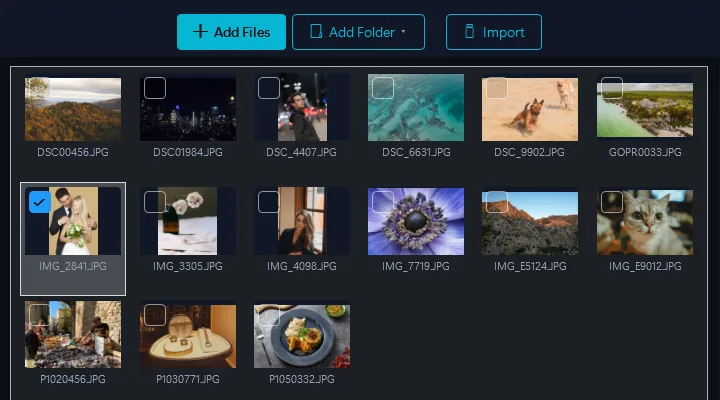
- 添加图片拖放文件或整个文件夹
- 选择AI修复选择AI照片修复效果 — AI自动分析并修复损伤
- 转换几分钟内完成所有输出
Contenta 内置 Gemini AI 修复。去除老照片上的划痕、撕裂、水渍和褪色。每张照片都通过您自己的 API 密钥发送到 Google Gemini。Google 每张收取几美分,我们不额外收费。
桌面 vs. 云端修复
云端服务
- 需要将个人照片上传到服务器
- 每张$1–5
- 批量限制(1–10张)
- 通用的千篇一律处理
- 您的家庭照片存储在第三方服务器上
Contenta(桌面版)
- 使用您自己的 Google Gemini 账号,而不是照片服务商的服务器
- $129一次性付款 — 无限量照片
- 一次批量修复数百张照片
- AI适应每张照片的特定损伤
- 在同一次桌面处理中完成修复与格式转换
使用场景
家庭相册
修复有划痕、撕裂和褪色的几十年前的家庭照片。让祖父母���婚礼照片重获新生。
历史档案
批量数字化和修复博物馆藏品、报纸档案和历史文献。
损坏的打印件和扫描件
修复水损打印件、破裂照片和发黄扫描件。自动去除污渍和变色。
专业修复
照片修复服务可以批量处理客户订单。每个项目节省数小时的Photoshop手动修图时间。
为什么要按张付费?
云端修复服务每张的费用
每张,由 Google 向您自己的 Gemini 密钥计费。我们不额外收费。
$129一次性购买。一次批量处理即可回本。AI修复是50多项功能之一。
使用前后对比
使用Contenta之前
将损坏的照片逐一上传到云端服务。每张支付$1–5。等待处理。个人家庭照片存在隐私问题。
使用Contenta之后
一次拖入数百张受损照片,整本相册一次运行即可修复。每张照片都通过您自己的 API 密钥发送到 Google Gemini,Google 每张收取几美分。我们不额外收费。划痕、撕裂和水渍会自动去除。
今天就开始转换照片
选择适合您的计划。所有计划均包含所有功能。
没有订阅陷阱。Contenta是一次性购买 — 比2个月Lightroom更便宜,永远属于您。
常见问题
Contenta 可读取 100 多种输入格式,包括 JPEG、PNG、TIFF、WebP、HEIC、AVIF、BMP、GIF、PDF 以及 30 多种相机 RAW 格式(CR2、NEF、ARW、DNG、RAF 等),并可写出 28 种输出格式。
没有限制。Contenta使用多核处理,几分钟内即可转换数千张图片。用户经常一次处理10,000多张照片。
是的。Contenta支持来自Canon、Nikon、Sony、Fuji、Panasonic、Olympus等品牌的30种以上RAW格式。内置白平衡、降噪和色彩调整。
全部功能、全部文件、不限时间。每批文件都会完整转换;结果带有小水印,直到您从中选出最多 10 个保留为无水印版本。选择次数按每台电脑计算一次,不按批次计算,500 个文件的批次在您选择之前不消耗任何次数。购买许可证(一次性 $129)后,您转换的所有文件都不再带水印。
不需要。Contenta Converter是一次性购买。支付一次即可永久拥有,包括所有未来更新。没有月费或年费。
用户评价
“我使用Contenta Converter已经好几年了,它为我节省了无数小时的工作时间。强烈推荐!”
“简单、快速,完全符合承诺。批量处理效率令人难以置信。”
“我找到的最好的图像转换器。RAW支持和元数据处理一流。”
免费试用,之后$129一次性付款。无月费。
由 ContentaSoft 发布,位于瑞典于默奥,Contenta Converter PREMIUM 的开发商。
Contenta Converter PREMIUM 是一款 Windows 桌面应用程序,可批量转换、调整大小、重命名、添加水印和处理 100 多种格式的图像,包括 JPEG、PNG、WebP、HEIC、TIFF、RAW 和 PDF。
本软件不含任何广告软件、间谍软件、工具栏或捆绑的第三方程序。安装程序仅安装 Contenta Converter PREMIUM。
转换、调整尺寸、水印和元数据处理均在您的计算机上完成。可选的 AI 功能(去除背景、照片修复、上色)会使用您自己的 API 密钥将相应图像发送至 Google Gemini。本软件不收集个人数据。
全功能免费试用,不限时间:每个文件都会转换,您选择的最多 10 个结果无水印,其余带水印。终身许可证:$129(一次性付款,无订阅)。
如何卸载
打开 Windows Settings > Apps > 已安装的应用,在列表中找到Contenta Converter PREMIUM并点击卸载。您也可以从安装文件夹运行卸载程序,或使用 Control Panel > Programs and Features。
下载大小:约 2 MB(Web 安装程序)。安装过程中会下载附加组件(总计约 300 MB)。