傷んだ古い写真をAIでよみがえらせます。アルバムまるごと一度に処理
AIで傷、破れ、損傷した写真を修復 — バッチ処理、デスクトップで。
フォルダーをまるごと今すぐ変換。10 件の結果は透かしなしで無料で残せます。残りの透かしは $129 の一回払いで消えます。カード不要、アカウント不要、アップロード不要。 Windows 10・11 対応。
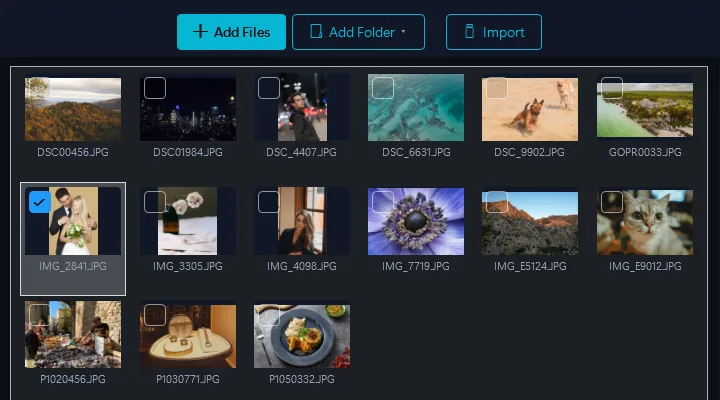
- 画像を追加ファイルまたはフォルダをドラッグ&ドロップ
- AI修復を選択AI写真修復エフェクトを選択 — AIが自動的に損傷を分析・修復します
- 変換数分ですべての出力が完了
Contenta に内蔵された Gemini AI 修復。古い写真の傷、破れ、水濡れ、退色を取り除きます。各写真はご自身の API キーで Google Gemini に送られます。Google が 1 枚あたり数セントを請求し、当社からの追加料金はありません。
デスクトップ vs. クラウド修復
クラウドサービス
- 個人写真をサーバーにアップロードする必要あり
- 1枚あたり$1〜5
- バッチ制限(1〜10枚)
- 一律の汎用処理
- 家族写真がサードパーティのサーバーに保存される
Contenta(デスクトップ)
- 写真サービスのサーバーではなく、ご自身の Google Gemini アカウントを使用
- $129の一回払い — 無制限の写真
- 数百枚の写真を一度に修復
- AIが各写真の固有の損傷に適応
- 復元と変換をデスクトップの同じパスで実行
使用例
家族写真アルバム
傷、破れ、色褪せのある数十年前の家族写真を修復。祖父母の結婚写真を蘇らせます。
歴史的アーカイブ
博物館コレクション、新聞アーカイブ、歴史的文書を一括でデジタル化・修復。
損傷した印刷物・スキャン
水損傷した印刷物、ひび割れた写真、黄ばんだスキャンを修復。シミや変色を自動的に除去。
プロフェッショナル修復
写真修復サービスがクライアントの注文をバッチ処理可能。案件ごとのPhotoshop手動レタッチを何時間も節約。
なぜ写真ごとに支払うのですか?
クラウド修復サービスでの1枚あたりの料金
1 枚あたり。ご自身の Gemini キーに Google が請求します。当社からの追加料金はありません。
$129の一回購入。1バッチで元が取れます。AI修復は60以上の機能の1つです。
ビフォー&アフター
Contenta導入前
損傷した写真をクラウドサービスに1枚ずつアップロード。画像ごとに$1〜5を支払い。処理を待つ。個人的な家族写真のプライバシーの懸念。
Contenta導入後
傷んだ写真を何百枚もまとめて追加し、アルバム全体を 1 回の実行で修復。各写真はご自身の API キーで Google Gemini に送られ、Google が 1 枚あたり数セントを請求します。当社からの追加料金はありません。傷、破れ、水濡れは自動で取り除かれます。
今日から写真変換を始めましょう
あなたに合ったプランをお選びください。すべてのプランにすべての機能が含まれています。
サブスクリプションの罠なし。Contentaは一回払い — Lightroom2ヶ月分より安く、永久にあなたのものです。
よくある質問
Contenta は JPEG、PNG、TIFF、WebP、HEIC、AVIF、BMP、GIF、PDF、30 以上のカメラ RAW 形式(CR2、NEF、ARW、DNG、RAF など)を含む 100 以上の入力形式を読み込み、28 種類の出力形式で書き出せます。
制限はありません。Contentaはマルチコア処理を使用して、数千枚の画像を数分で変換します。ユーザーは定期的に10,000枚以上の写真を一度に処理しています。
はい。ContentaはCanon、Nikon、Sony、Fuji、Panasonic、Olympusなど30以上のRAWフォーマットに対応。ホワイトバランス、ノイズ除去、色調整が内蔵されています。
すべての機能、すべてのファイル、期間制限なし。バッチはすべて変換され、結果には小さな透かしが入ります。そのうち最大 10 件を選ぶと透かしなしで残せます。この選択はバッチごとではなく PC ごとに 1 回数えられ、500 ファイルのバッチでも選ぶまでは消費されません。ライセンス($129 の一回払い)で、変換するすべてのファイルから透かしがなくなります。
いいえ。Contenta Converterは一回払いです。一度支払えば永久に所有でき、将来のアップデートもすべて含まれます。月額料金や年額料金はありません。
ユーザーの声
“Contenta Converterを何年も使っていますが、数え切れないほどの作業時間を節約できました。強くお勧めします!”
“シンプルで速く、約束通りの動作をします。バッチ処理は驚くほど効率的です。”
“今まで見つけた中で最高の画像コンバーターです。RAWサポートとメタデータ管理は一流です。”
無料試用後、$129の一回払い。月額料金なし。
ContentaSoft(スウェーデン、ウメオ)が発行,Contenta Converter PREMIUM の開発元。
Contenta Converter PREMIUM は、JPEG、PNG、WebP、HEIC、TIFF、RAW、PDF を含む100以上の形式の画像を一括変換、リサイズ、リネーム、ウォーターマーク付与、処理する Windows 用デスクトップアプリケーションです。
このソフトウェアには、アドウェア、スパイウェア、ツールバー、またはサードパーティ製プログラムは一切含まれていません。インストーラーは Contenta Converter PREMIUM のみをインストールします。
変換、リサイズ、透かし、メタデータの処理はお使いのコンピューター上で行われます。オプションのAI機能(背景除去、写真修復、カラー化)は、処理する画像をお客様ご自身のAPIキーで Google Gemini に送信します。本ソフトウェアは個人データを収集しません。
すべての機能が使える期間制限なしの無料体験:すべてのファイルを変換し、選んだ最大 10 件の結果は透かしなし、残りには透かしが入ります。永久ライセンス:$129(一回払い、サブスクリプションなし)。
アンインストール方法
Windows Settings > Apps > インストール済みアプリを開き、一覧から「Contenta Converter PREMIUM」を見つけてアンインストールをクリックしてください。インストールフォルダーからアンインストーラーを実行するか、Control Panel > Programs and Features を使用することもできます。
ダウンロードサイズ:約2 MB(Web インストーラー)。インストール中に追加コンポーネントがダウンロードされます(合計約300 MB)。