Halvera filstorleken på dina bilder — batchkonvertera en mapp till AVIF (eller tillbaka)
Konvertera till och fran AVIF. Betydligt mindre filer, utmarkt kvalitet.
AVIF sparar 30-50% filstorlek jamfort med JPEG vid samma kvalitet. Batchkonvertera tusentals bilder i bada riktningarna.
Ladda ner gratis — 30 dagars provperiod, inget kreditkortNasta generations format. Engangskop 129 $. Inget abonnemang.
Prova gratis i 30 dagar - Inget kreditkort krävs
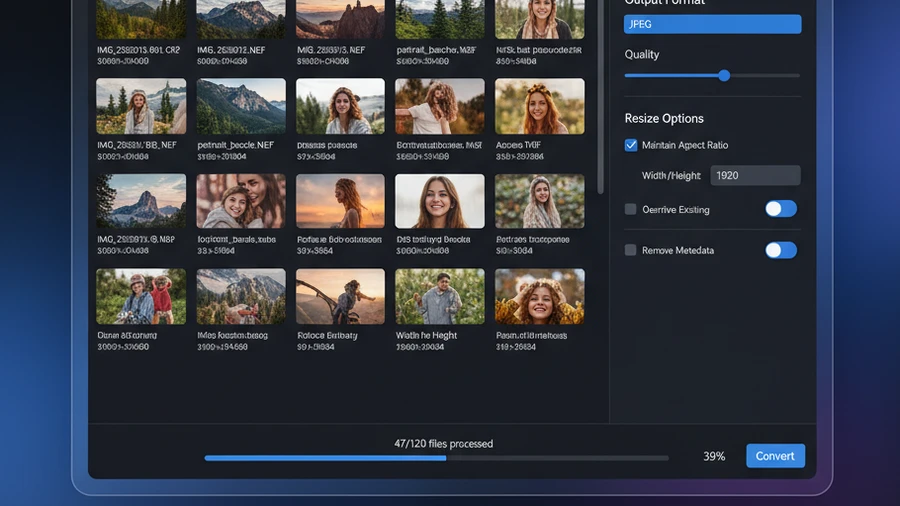
Så fungerar det
Lägg till dina bilder
Dra och släpp filer eller hela mappar
Valj riktning och kvalitet
Till AVIF eller fran AVIF, stall in kvalitetsniva och utdataformat
Konvertera
Alla resultat klara på några minuter
AVIF vs. WebP vs. JPEG
| Format | Typisk storlek | Kvalitet | Transparens |
|---|---|---|---|
| JPEG | 100% (baseline) | Bra | Nej |
| WebP | 25-35% mindre | Lika eller battre | Ja |
| AVIF | 30-50% mindre | Lika eller battre | Ja |
HEIC, AVIF, WebP eller JPEG: vilket bildformat ska du välja (2026)
Windows · gratis provversion · betala en gång, ingen prenumeration
Berättad på engelska, med undertexter · Ont om tid? Se versionen på en minut
Fungerar bada vagarna
Till AVIF
Optimera dina bilder med det mest effektiva formatet. Konvertera JPEG, PNG eller WebP till AVIF for maximal komprimering med utmarkt kvalitet.
Fran AVIF
Behover du redigera eller dela AVIF-filer? Konvertera dem tillbaka till JPEG, PNG eller TIFF for full kompatibilitet.
Före och efter
Före Contenta
Stora JPEG- och PNG-filer tar for mycket plats. AVIF-filer kan inte oppnas i aldre programvara. Manuell konvertering en fil i taget.
Efter Contenta
Dra hela mappar, fa optimerade AVIF-filer pa minuter. Eller konvertera AVIF tillbaka till JPEG/PNG. Ett verktyg, bada riktningarna.
Börja konvertera foton idag
Välj den plan som passar dig. Alla planer inkluderar alla funktioner.
Ingen abonnemangsfälla. Contenta är ett engångsköp — billigare än 2 månader av Lightroom, och det är ditt för alltid.
Vanliga frågor
Contenta läser och skriver över 50 format inklusive JPEG, PNG, TIFF, WebP, HEIC, AVIF, BMP, GIF, PDF och över 25 kamera-RAW-format (CR2, NEF, ARW, DNG, RAF med flera).
Det finns ingen gräns. Contenta använder flerkärnig bearbetning för att konvertera tusentals bilder på minuter. Användare bearbetar regelbundet över 10 000 foton i en enda batch.
Ja. Contenta stöder över 25 RAW-format från Canon, Nikon, Sony, Fuji, Panasonic, Olympus med flera. Vitbalans, brusreducering och färgkontroll är inbyggt.
30-dagars testperioden inkluderar alla funktioner. De första 10 bilderna per batch bearbetas utan vattenstämpel. Därefter läggs en liten vattenstämpel till. Köp en licens för att ta bort alla begränsningar.
Nej. Contenta Converter är ett engångsköp. Du betalar en gång och äger det för alltid, inklusive alla framtida uppdateringar. Inga månads- eller årsavgifter.
Vad våra användare säger
“Jag har använt Contenta Converter i åratal och det har sparat mig otaliga timmars arbete. Starkt rekommenderat!”
“Enkelt, snabbt och gör exakt vad det lovar. Batchbearbetningen är otroligt effektiv.”
“Den bästa bildkonverteraren jag har hittat. RAW-stödet och metadatahanteringen är förstklassiga.”
Gratis provversion, sedan $129 en gång. Inga månadsavgifter.
Utgiven av ContentaSoft, Umea, Sverige, utvecklaren av Contenta Converter PREMIUM.
Contenta Converter PREMIUM är en skrivbordsapplikation för Windows som batchkonverterar, skalerar, byter namn på, vattenmärker och bearbetar bilder i över 60 format, inklusive JPEG, PNG, WebP, HEIC, TIFF, RAW och PDF.
Denna programvara innehåller ingen adware, spyware, verktygsfält eller medföljande tredjepartsprogram. Installationsprogrammet installerar enbart Contenta Converter PREMIUM.
Konvertering, storleksändring, vattenstämplar och metadata behandlas på din dator. De valfria AI-funktionerna (ta bort bakgrund, fotorestaurering, färgläggning) skickar de bilder som behandlas till Google Gemini med din egen API-nyckel. Programvaran samlar inte in personuppgifter.
Gratis 30-dagars provversion med full funktionalitet. Efter provperioden krävs en licensnyckel. Livstidslicens: $129 (engångsbetalning, inget abonnemang).
Så här avinstallerar du
Öppna Windows Settings > Apps > Installerade appar, hitta „Contenta Converter PREMIUM“ i listan och klicka på Avinstallera. Du kan även köra avinstallationsprogrammet från installationsmappen eller använda Control Panel > Programs and Features.
Nedladdningsstorlek: ~2 MB (web-installer). Ytterligare komponenter laddas ned under installationen (~300 MB totalt).