Redimensionneur d'images par lot pour E-Commerce
Redimensionnez les photos produit aux spécifications exactes des marketplaces — toutes les plateformes, un seul lot.
Amazon, Etsy, Shopify, eBay, Walmart, WooCommerce : chacun exige des dimensions en pixels différentes. Contenta les gère toutes en une fois.
Téléchargement gratuit — Essai 30 jours, sans carte bancaireUtilisé par les vendeurs en ligne du monde entier. $129 en une fois. Sans abonnement.
Essayez gratuitement pendant 30 jours - Aucune carte de crédit requise
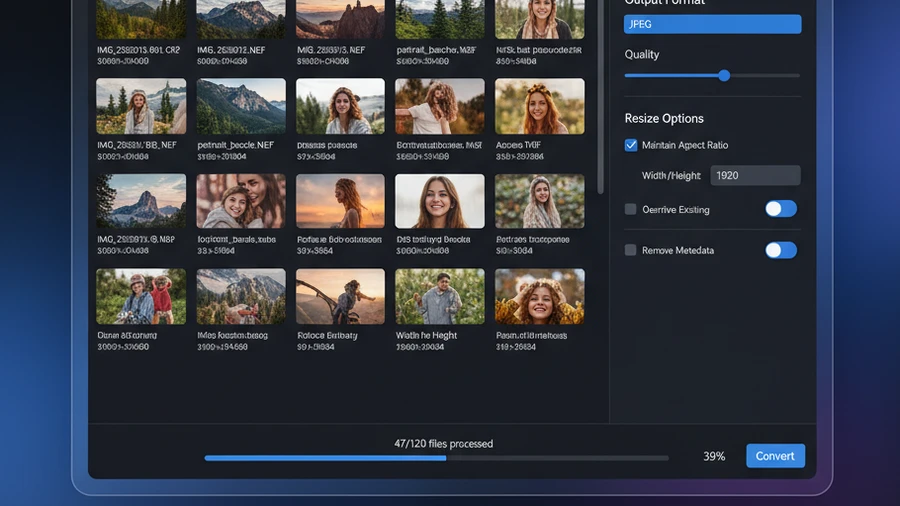
Comment ça marche
Ajoutez vos images
Glissez-déposez des fichiers ou des dossiers entiers
Sélectionner les plateformes et tailles
Choisir les marketplaces cibles ou définir des dimensions personnalisées
Convertir
Tous les fichiers prêts en quelques minutes
Dimensions requises par plateforme
| Plateforme | Image principale | Taille max. | Format |
|---|---|---|---|
| Amazon | 2000 × 2000 px | 10 Mo | JPEG |
| Etsy | 2000 × 2000 px | 10 Mo | JPEG / PNG |
| Shopify | 2048 × 2048 px | 20 Mo | JPEG / PNG / WebP |
| eBay | 1600 × 1600 px | 12 Mo | JPEG |
| Walmart | 2000 × 2000 px | 10 Mo | JPEG |
| WooCommerce | 1200 × 1200 px | Sans limite | JPEG / PNG / WebP |
Modes de redimensionnement
Pixels exacts
Redimensionner aux dimensions exactes largeur × hauteur pour la conformité plateforme
Dimension maximale
Réduire pour que le côté le plus long respecte votre limite
Remplir en carré
Ajouter un fond blanc pour rendre les images rectangulaires carrées
Recadrer pour remplir
Recadrer et centrer pour remplir exactement les dimensions cibles
Avant & Après
Avant Contenta
Redimensionner chaque photo manuellement dans Photoshop pour chaque marketplace. Des tailles différentes pour Amazon, Etsy, Shopify. Des heures de travail répétitif.
Après Contenta
Sélectionnez les plateformes, déposez vos photos, appuyez sur Convertir. Toutes les tailles marketplace prêtes dans des sous-dossiers. Des minutes, pas des heures.
Commencez à convertir vos photos dès aujourd'hui
Choisissez le plan qui vous convient. Tous les plans incluent toutes les fonctionnalités.
Pas de piège d'abonnement. Contenta est un achat unique — moins cher que 2 mois de Lightroom, et c'est à vous pour toujours.
Questions fréquentes
Contenta lit et écrit plus de 50 formats dont JPEG, PNG, TIFF, WebP, HEIC, AVIF, BMP, GIF, PDF et plus de 25 formats RAW (CR2, NEF, ARW, DNG, RAF, etc.).
Il n'y a pas de limite. Contenta utilise le traitement multi-cœur pour convertir des milliers d'images en minutes. Les utilisateurs traitent régulièrement plus de 10 000 photos en un seul lot.
Oui. Contenta prend en charge plus de 25 formats RAW de Canon, Nikon, Sony, Fuji, Panasonic, Olympus et plus. Balance des blancs, réduction du bruit et contrôle des couleurs intégrés.
L'essai de 30 jours inclut toutes les fonctionnalités. Les 10 premières images par lot sont traitées sans filigrane. Ensuite, un petit filigrane est ajouté. Achetez une licence pour supprimer toutes les limitations.
Non. Contenta Converter est un achat unique. Vous payez une fois et le possédez pour toujours, y compris toutes les mises à jour futures. Aucun frais mensuel ou annuel.
Ce que disent nos utilisateurs
“J'utilise Contenta Converter depuis des années et il m'a fait gagner un temps considérable. Je le recommande vivement !”
“Simple, rapide et fait exactement ce qu'il promet. Le traitement par lots est incroyablement efficace.”
“Le meilleur convertisseur d'images que j'ai trouvé. La prise en charge RAW et la gestion des métadonnées sont excellentes.”
Essai gratuit, puis $129 en une fois. Pas de frais mensuels.
Publié par ContentaSoft, Umea, Suède — développeur de Contenta Converter PREMIUM.
Contenta Converter PREMIUM est une application de bureau pour Windows qui convertit, redimensionne, renomme, filigrane et traite par lots des images dans plus de 60 formats, dont JPEG, PNG, WebP, HEIC, TIFF, RAW et PDF.
Ce logiciel ne contient aucun adware, spyware, barre d'outils ou programme tiers. Le programme d'installation installe uniquement Contenta Converter PREMIUM.
Toutes les images sont traitées localement sur votre ordinateur. Aucun fichier n'est envoyé vers un serveur. Le logiciel ne collecte aucune donnée personnelle.
Essai gratuit de 30 jours avec toutes les fonctionnalités. Après la période d'essai, une clé de licence est requise. Licence à vie : $129 (paiement unique, sans abonnement).
Comment désinstaller
Ouvrez Windows Settings > Apps > Applications installées, recherchez « Contenta Converter PREMIUM » dans la liste et cliquez sur Désinstaller. Vous pouvez également exécuter le programme de désinstallation depuis le dossier d'installation ou utiliser Control Panel > Programs and Features.
Taille du téléchargement : ~2 Mo (installateur web). Des composants supplémentaires sont téléchargés pendant l'installation (~150 Mo au total).