Bulk Convert WebP, AVIF, HEIC - Optimize Images for PageSpeed
Convert entire image directories to WebP or AVIF in one batch. Cut page weight by 60-80%. No cloud uploads, no per-image limits.
Used by web developers and agencies to hit 90+ PageSpeed scores.
Download Free — 30-Day Trial, No Credit CardFree 30-day trial. Then $129 once - no subscription, unlimited images.
Try Free for 30 Days - No Credit Card Required
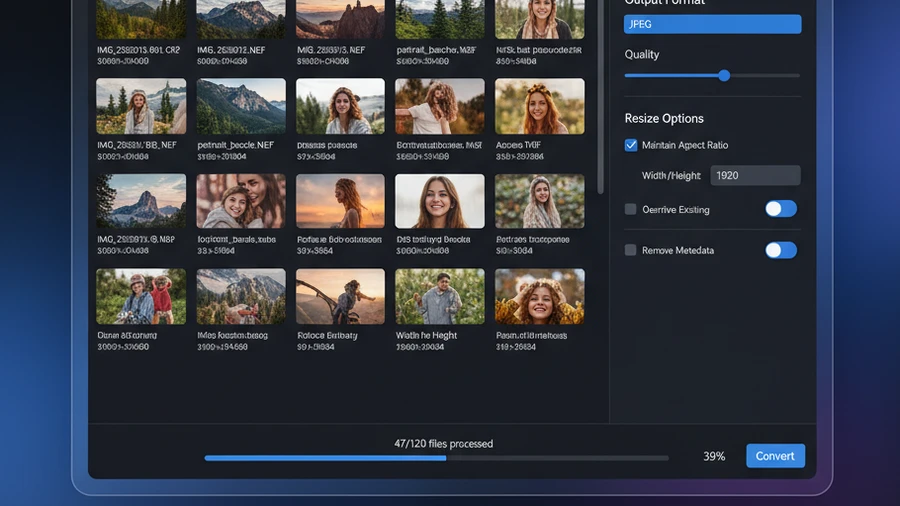
How It Works
Add your images
Drop entire /images folders - PNG, JPEG, BMP, TIFF, HEIC, any format.
Set format and quality
Choose WebP, AVIF, or JPEG. Set quality target for optimal size/quality balance.
Convert
All images converted and compressed. Upload to your server. PageSpeed improved.
Conversion Savings
| Conversion | Typical Savings | Note |
|---|---|---|
| PNG → WebP | 60–80% | Best for screenshots, diagrams, graphics with transparency |
| JPEG → WebP | 25–35% | Good for photos - smaller files with equal visual quality |
| PNG → AVIF | 70–90% | Maximum compression - excellent for modern browsers |
| HEIC → JPEG | — | Convert iPhone photos to universal web format |
| HEIC → WebP | 10–20% | Modern format to modern format - best of both worlds |
| BMP/TIFF → WebP | 90%+ | Legacy formats shrink dramatically - update old sites fast |
Before & After
Before Contenta
Upload images one-by-one to TinyPNG. Wait. Download. Re-upload to server. Hit the 500-image monthly limit. Try another tool. Repeat.
After Contenta
Drop the entire /images folder into Contenta. Choose WebP at quality 80. Click Convert. Upload the output folder. PageSpeed score jumps 30 points.
Start Converting Photos Today
Choose the plan that works for you. All plans include every feature.
No subscription trap. Contenta is a one-time purchase — less than 2 months of Lightroom, and it's yours forever.
Frequently Asked Questions
Contenta reads and writes 50+ formats including JPEG, PNG, TIFF, WebP, HEIC, AVIF, BMP, GIF, PDF, and 25+ camera RAW formats (CR2, NEF, ARW, DNG, RAF, and more).
There is no limit. Contenta uses multi-core processing to convert thousands of images in minutes. Users regularly process 10,000+ photos in a single batch.
Yes. Contenta supports 25+ RAW formats from Canon, Nikon, Sony, Fuji, Panasonic, Olympus, and more. Full white balance, denoising, and color adjustment controls are built in.
The 30-day trial includes all features. The first 10 images per batch are processed without watermarks. After that, a small watermark is added. Purchase a license to remove all limitations.
No. Contenta Converter is a one-time purchase. You pay once and own it forever, including all future updates. No monthly or yearly fees.
What Our Users Say
“I have been using Contenta Converter for years and it has saved me countless hours of work. Highly recommended!”
“Simple, fast, and does exactly what it promises. The batch processing is incredibly efficient.”
“Best image converter I have found. The RAW support and metadata handling are top-notch.”
Published by ContentaSoft, Umea, Sweden — developer of Contenta Converter PREMIUM.
Contenta Converter PREMIUM is a desktop application for Windows that batch converts, resizes, renames, watermarks, and processes images in 60+ formats including JPEG, PNG, WebP, HEIC, TIFF, RAW, and PDF.
This software contains no adware, spyware, toolbars, or bundled third-party programs. The installer installs only Contenta Converter PREMIUM.
All images are processed locally on your computer. No files are uploaded to any server. The software does not collect personal data.
Free 30-day trial with full functionality. After the trial, a license key is required. Lifetime license: $129 (one-time payment, no subscription).
How to Uninstall
Open Windows Settings > Apps > Installed apps, find "Contenta Converter PREMIUM" in the list, and click Uninstall. You can also run the uninstaller from the installation folder or use Control Panel > Programs and Features.
Download size: ~2 MB (web installer). Additional components are downloaded during installation (~150 MB total).