Batch Convert RAW to JPEG - 60+ Formats, Multi-Core, No Subscription
Convert CR2, NEF, ARW and 25+ RAW formats to JPEG, TIFF, WebP, AVIF in one batch. Multi-core processing handles thousands of photos in minutes.
Used by 41,000+ photographers worldwide. Full EXIF/IPTC/XMP metadata control. 35+ built-in effects.
Download Free — 30-Day Trial, No Credit CardFree 30-day trial. Then USD129 once - no monthly fees, no per-image charges.
Try Free for 30 Days - No Credit Card Required
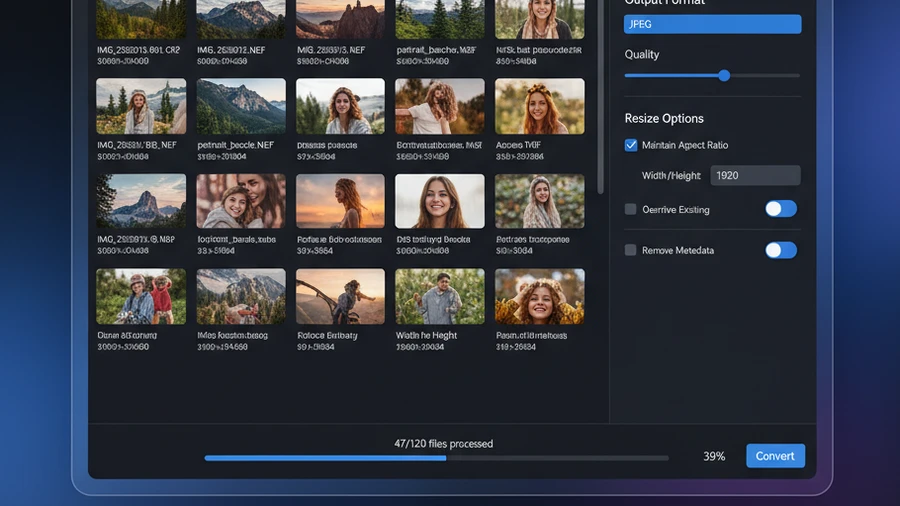
How It Works
Add your photos
Drag your RAW files or entire folders - CR2, NEF, ARW, RAF, DNG, and 55+ more formats.
Choose output settings
Pick format, quality, resize, effects, watermark, and metadata options.
Convert
Multi-core engine converts thousands of photos. Preserves or updates metadata.
Supported RAW Formats
| Input Format | Output Options | Note |
|---|---|---|
| Canon CR2 / CR3 | JPEG, TIFF, PNG, WebP | Full EOS R, 5D, 90D series support with white balance control |
| Nikon NEF / NRW | JPEG, TIFF, PNG, WebP | Z-series and DSLR RAW with exposure correction |
| Sony ARW | JPEG, TIFF, PNG, WebP | Alpha and RX series with color profile support |
| Fuji RAF | JPEG, TIFF, PNG, WebP | X-series and GFX with film simulation preservation |
| Apple HEIC / HEIF | JPEG, TIFF, PNG, WebP | iPhone and iPad photos - batch convert to universal JPEG |
| DNG, PSD, TIFF | JPEG, PNG, WebP, AVIF | Adobe DNG, Photoshop PSD, multi-page TIFF - all supported |
Built for Photographers
60+ Formats
Every RAW format plus JPEG, PNG, TIFF, WebP, AVIF, PSD, PDF, and more.
Multi-Core Engine
Uses all CPU cores. 500 RAW files converted in minutes, not hours.
Metadata Control
Read, write, preserve or strip EXIF, IPTC, XMP. Set copyright, keywords, creator.
35+ Effects
Sharpen, blur, B and W, sepia, color adjustments. Chain multiple effects in one pass.
Keeps Your Folder Structure
Batch-export a whole shoot and Contenta recreates your source subfolders in the output — every session and client folder stays exactly where you expect.
USD129 One-Time
No subscription. No monthly fees. Includes CLI and all future updates.
Before & After
Before Contenta
Import 200 RAW files into Lightroom. Wait 45 minutes for export. One output format at a time. No batch watermarking. No command line.
After Contenta
Drop 200 RAW files into Contenta. Multi-core processing converts all to JPEG in 8 minutes. Add watermarks, effects, and a PDF album in the same batch.
Processing Speed
minutes to export 200 RAW files (single-core)
minutes with Contenta multi-core processing
$129 One-Time. All Features Included.
RAW conversion, watermarking, 35+ effects, PDF albums, metadata control — all in one tool. No plugins, no subscriptions.
Start Converting Photos Today
Choose the plan that works for you. All plans include every feature.
No subscription trap. Contenta is a one-time purchase — less than 2 months of Lightroom, and it's yours forever.
Frequently Asked Questions
Contenta reads and writes 60+ formats including JPEG, PNG, TIFF, WebP, HEIC, AVIF, BMP, GIF, PDF, and 25+ camera RAW formats (CR2, NEF, ARW, DNG, RAF, and more).
There is no limit. Contenta uses multi-core processing to convert thousands of images in minutes. Users regularly process 10,000+ photos in a single batch.
Yes. Contenta supports 25+ RAW formats from Canon, Nikon, Sony, Fuji, Panasonic, Olympus, and more. Full white balance, denoising, and color adjustment controls are built in.
The 30-day trial includes every feature. The first 10 images you convert are saved without a watermark. That allowance is counted once across the whole trial, not per batch, so conversions after it carry a small watermark. A license removes it.
No. Contenta Converter is a one-time purchase. You pay once and own it forever, including all future updates. No monthly or yearly fees.
What Our Users Say
“I have been using Contenta Converter for years and it has saved me countless hours of work. Highly recommended!”
“Simple, fast, and does exactly what it promises. The batch processing is incredibly efficient.”
“Best image converter I have found. The RAW support and metadata handling are top-notch.”
Published by ContentaSoft, Umea, Sweden, developer of Contenta Converter PREMIUM.
Contenta Converter PREMIUM is a desktop application for Windows that batch converts, resizes, renames, watermarks, and processes images in 60+ formats including JPEG, PNG, WebP, HEIC, TIFF, RAW, and PDF.
This software contains no adware, spyware, toolbars, or bundled third-party programs. The installer installs only Contenta Converter PREMIUM.
Conversion, resizing, watermarking and metadata editing run on your computer. The optional AI features (background removal, photo restoration, colorize) send the images you process with them to Google Gemini using your own API key. The software does not collect personal data.
Free 30-day trial with full functionality. After the trial, a license key is required. Lifetime license: $129 (one-time payment, no subscription).
How to Uninstall
Open Windows Settings > Apps > Installed apps, find "Contenta Converter PREMIUM" in the list, and click Uninstall. You can also run the uninstaller from the installation folder or use Control Panel > Programs and Features.
Download size: ~2 MB (web installer). Additional components are downloaded during installation (~300 MB total).