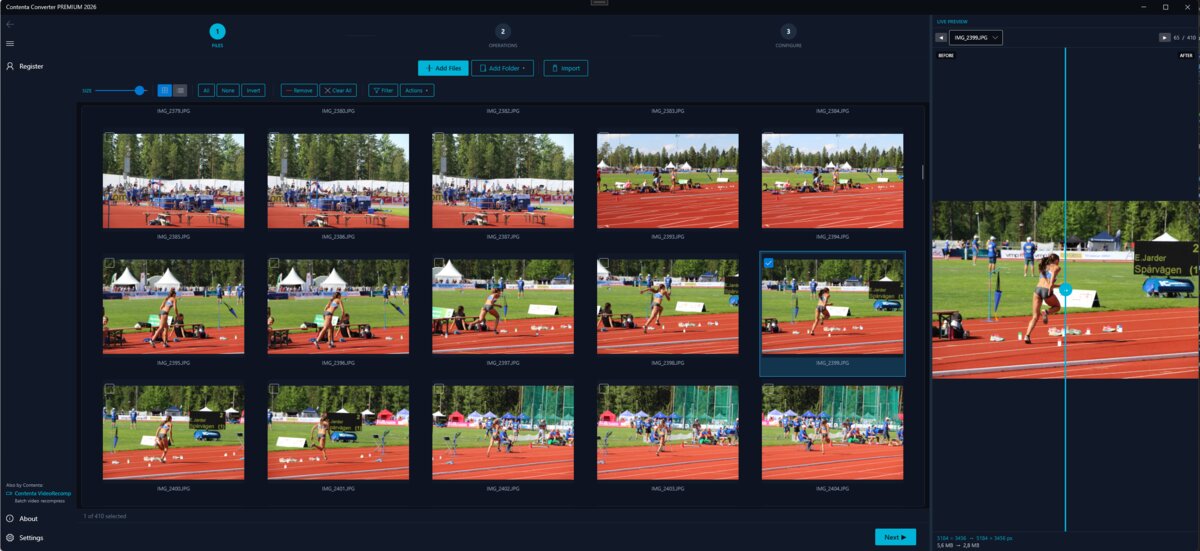
CONTENTA CONVERTER PREMIUM
Thousands of photos:
converted, resized & watermarked in minutes
Convert the whole folder now: RAW, HEIC, JPEG and 100+ formats, right on your PC. Keep 10 results clean, free. $129 once removes the watermark from the rest. No card, no account, no upload.
Setup stalled while downloading, or blocked by your antivirus? Download the full offline installer (224 MB)
Windows 10/11
Free trial: keep 10 results clean, no time limit
·
Works offline
·
30-Day Money-Back Guarantee
·
Lost your key?
v9.1.0
Please note that Contenta Software programs do not allow you to copy protected material. You may use this software in copying material in which you own the copyright or have obtained permission to copy from the copyright owner.
Intel and Core 2 Duo are registered trademarks of Intel Corporation. AMD and Athlon X2 are registered trademarks of Advanced Micro Devices, Inc. Windows 10/8/7/XP/2003/Vista are registered trademarks of Microsoft Corporation. Mac Os X is a registered trademarks of Apple, Inc. All other trademarks are the property of their respective owners.
Every feature, every file and no time limit. Each batch converts in full; results carry a small watermark until you pick up to 10 of them to keep clean. Those picks count once per PC, not per batch, and a batch of 500 costs none until you choose. A license ($129 once) removes the watermark from everything you convert. The command line, the MCP server and watch folders keep the first 10 files clean instead, from the same allowance. Each file you keep costs one pick: a multi-size result costs one per size, and a PDF album, merged PDF, collage or slideshow costs one. A PC that already used its 10 free images with an earlier version starts with no picks left.
Windows 11, 10 (64 bit)
- Optimized for multi-core processors
- 512 MB RAM
- 1 GB free disk space
Setup stalled while downloading, or blocked by your antivirus? Download the full offline installer (224 MB)
Published by ContentaSoft, Umea, Sweden, developer of Contenta Converter PREMIUM.
Contenta Converter PREMIUM is a desktop application for Windows that batch converts, resizes, renames, watermarks, and processes images in 100+ formats including JPEG, PNG, WebP, HEIC, TIFF, RAW, and PDF.
This software contains no adware, spyware, toolbars, or bundled third-party programs. The installer installs only Contenta Converter PREMIUM.
Conversion, resizing, watermarking and metadata editing run on your computer. The optional AI features (background removal, photo restoration, colorize) send the images you process with them to Google Gemini using your own API key. The software does not collect personal data.
Free trial with every feature and no time limit: every file converts, up to 10 results you pick stay clean and the rest carry a watermark. Lifetime license: $129, one-time payment, or subscribe.
How to Uninstall
Open Windows Settings > Apps > Installed apps, find "Contenta Converter PREMIUM" in the list, and click Uninstall. You can also run the uninstaller from the installation folder or use Control Panel > Programs and Features.
Download size: ~2 MB (web installer). Additional components are downloaded during installation (~190 MB total).
Privacy policy |
Terms Of Use