メインコンテンツへスキップ
9月セール:永久ライセンスが$129→$64.50。9月30日まで。残り2日今すぐ購入 →

Olympus

Olympus E-500の写真を変換・整理

Olympus E-500 の写真をフォルダーごと JPG・PNG・TIFF・PDF に一括変換できます。同時に、リサイズ、名前の変更、フォルダー分けも行えます。

無料体験版 — 30日間、全機能利用可能 すべての機能を見る →

$129の買い切り。サブスクリプションなし、画像ごとの課金なし。

  • 30日間無料トライアル
  • 最初の 10 枚は透かしなし
  • Windows 10/11
  • オフラインで動作
  • 世界中で100,000人以上のユーザー
変換前
RAF

DSCF0014.RAF

15.2 MB

カメラの RAW:大きく共有しにくい
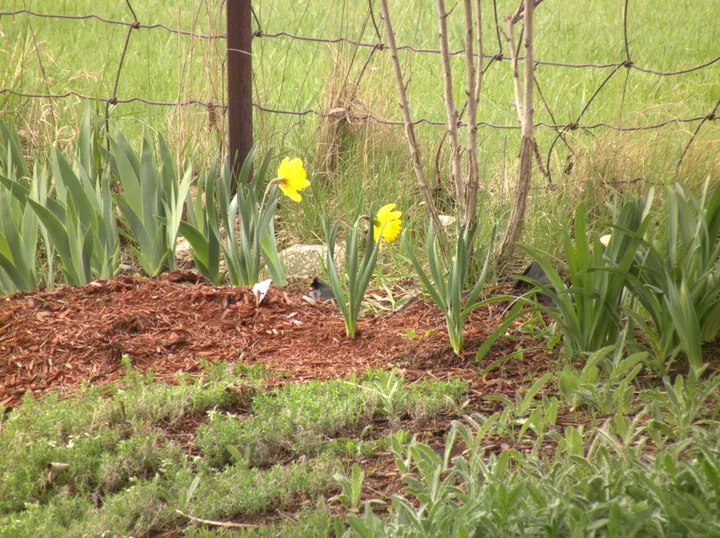
変換後花壇の水仙:Fujifilm の RAF ファイルから Contenta Converter が作成した JPG

DSCF0014.jpg

2.8 MB · 3664×2742 · 0.6 s

JPG:どこでも開けます

Contenta Converter の実際の出力:15.2 MB の Fujifilm RAF ファイルが、デスクトップ PC で 0.6 秒後に 2.8 MB の 3664 x 2742 JPG になりました。
  1. 体験版をダウンロードし、Windows 10 または 11 にインストールします。
  2. 写真、またはフォルダーごと Contenta Converter にドロップします。
  3. JPG・PNG・TIFF・PDF から選び、「変換を開始」をクリックします。

このカメラの読み込み形式:ORFJPGTIF

変換先の形式:JPGPNGTIFFPDFWEBPHEICAVIF

カメラモデルについての情報
カンパニー Olympus Imaging Corp.
モデル E-500
60+
画像フォーマット
100K+
満足のユーザー
35+
エフェクト&フィルター

推薦:

“Contenta Converterを何年も使っていますが、数え切れないほどの作業時間を節約できました。強くお勧めします!”

“シンプルで速く、約束通りの動作をします。バッチ処理は驚くほど効率的です。”

“今まで見つけた中で最高の画像コンバーターです。RAWサポートとメタデータ管理は一流です。”

世界中の100,000人以上のユーザーに信頼されています
Contenta Converter PREMIUM Windows

満足保証:

プロフェッショナルな写真変換機能がこんなに簡単に行えます。
世界中のフォトグラファー、デザイナー、企業に信頼されています。
リスク無し. 購入後、30日間であれば返品払い戻しが可能。一切理由は聞きません。

このブランドの他のカメラ

Olympus Imaging Corp. E-M5MarkII Olympus Imaging Corp. E-PL3 Olympus Imaging Corp. E-M5 Olympus Imaging Corp. E-M1 Olympus Imaging Corp. E-M10 Olympus Imaging Corp. E-520 Olympus Imaging Corp. E-PL7 Olympus Imaging Corp. E-PL1 Olympus Imaging Corp. E-510 Olympus Imaging Corp. E-420 Olympus Imaging Corp. STYLUS1 Olympus Imaging Corp. E-410 Olympus Imaging Corp. E-P2 Olympus Imaging Corp. E-PL6 Olympus Imaging Corp. E-PL5 Olympus Imaging Corp. E-3 Olympus Imaging Corp. E-620 Olympus Imaging Corp. E-450 Olympus Imaging Corp. E-500 Olympus Imaging Corp. E-PL1s Olympus Imaging Corp. XZ-1 Olympus Imaging Corp. SZ-30MR Olympus Imaging Corp. FE230/X790 Olympus Imaging Corp. FE210,X775 Olympus Imaging Corp. uTough-3000 Olympus Imaging Corp. u7010,S7010 Olympus Imaging Corp. E-PM1 Olympus Imaging Corp. E-P5 Olympus Imaging Corp. VR340,D750 Olympus Imaging Corp. E-PL2 Olympus Imaging Corp. STYLUS1,1s Olympus Imaging Corp. FE25,X20 Olympus Imaging Corp. u1010,S1010 Olympus Imaging Corp. E-600 Olympus Imaging Corp. E-PM2 Olympus Imaging Corp. E-330 Olympus Imaging Corp. E-300 Olympus Imaging Corp. uT6000,ST6000 Olympus Imaging Corp. SP-810UZ Olympus Imaging Corp. E-400 Olympus Imaging Corp. FE4000,X920,X925 Olympus Imaging Corp. VG110,D700 Olympus Imaging Corp. u700,S700 Olympus Imaging Corp. FE115,X715 Olympus Imaging Corp. E-30 Olympus Imaging Corp. VG145,VG140,D715 Olympus Imaging Corp. E-P3 Olympus Imaging Corp. SZ-17 Olympus Imaging Corp. TG-1 Olympus Imaging Corp. XZ-2 Olympus Imaging Corp. FE47,X43 Olympus Imaging Corp. E-P1 Olympus Imaging Corp. SP560UZ Olympus Imaging Corp. SP570UZ Olympus Imaging Corp. u5010,S5010 Olympus Imaging Corp. FE220,X785 Olympus Imaging Corp. SP510UZ Olympus Imaging Corp. u790SW,S790SW Olympus Imaging Corp. TG-320 Olympus Imaging Corp. VG130,D710 Olympus Imaging Corp. C55Z,C5500Z Olympus Imaging Corp. FE110,X705 Olympus Imaging Corp. VG120,D705 Olympus Imaging Corp. FE5020,X935 Olympus Imaging Corp. u7000,S7000 Olympus Imaging Corp. Olympus Imaging Corp. E-5 Olympus Imaging Corp. uD600,S600 Olympus Imaging Corp. XZ-10 Olympus Imaging Corp. u550WP,S550WP Olympus Imaging Corp. SH-25MR Olympus Imaging Corp. SP-720UZ Olympus Imaging Corp. SP500UZ Olympus Imaging Corp. SP600UZ Olympus Imaging Corp. u1060,S1060 Olympus Imaging Corp. FE240/X795 Olympus Imaging Corp. Scanner Olympus Imaging Corp. SP550UZ Olympus Imaging Corp. SP565UZ Olympus Imaging Corp. u850SW,S850SW Olympus Imaging Corp. VG170

よくある質問

Olympus E-500はどのような画像フォーマットを生成しますか?

Olympus E-500はimageファイルを生成します。Contenta Converter PREMIUMを使用して、JPG、TIFF、PNG、PDF、WEBPなど多くのフォーマットに変換できます。

Olympus E-500の写真を変換するには?

Contenta Converter PREMIUMをダウンロードし、写真をドラッグ&ドロップし、出力形式を選択して変換をクリックします。数百ファイルの一括変換に対応しています。

Contenta ConverterはRAWファイルとメタデータに対応していますか?

はい。Contenta Converter PREMIUMは主要カメラブランドのRAWファイルを読み取り、変換時にIPTC/XMPメタデータ(著作権、位置情報、説明など)を保持または更新できます。

Olympus E-500の写真に透かしを追加できますか?

テキストまたは画像の透かしをすべての写真に一度に追加できます。Contenta Converter PREMIUMでは、位置、不透明度、サイズを選択して、すべてのエクスポートで一貫したブランディングを実現できます。

Contenta Converterは無料で試せますか?

はい。体験版は 30 日間、すべての機能を使えます。最初の 10 枚は透かしなしで保存され、それ以降の書き出しには小さな透かしが入ります。ライセンスを購入すると、透かしと期間制限がなくなります。

写真を変換する準備はできましたか? 無料トライアル