.pcx
PCX Image Conversion: Batch Convert, Resize & Organize
Contenta Converter PREMIUM lets you open, convert, and batch process PCX files into modern formats like JPG, PNG, TIFF, PDF, and more.
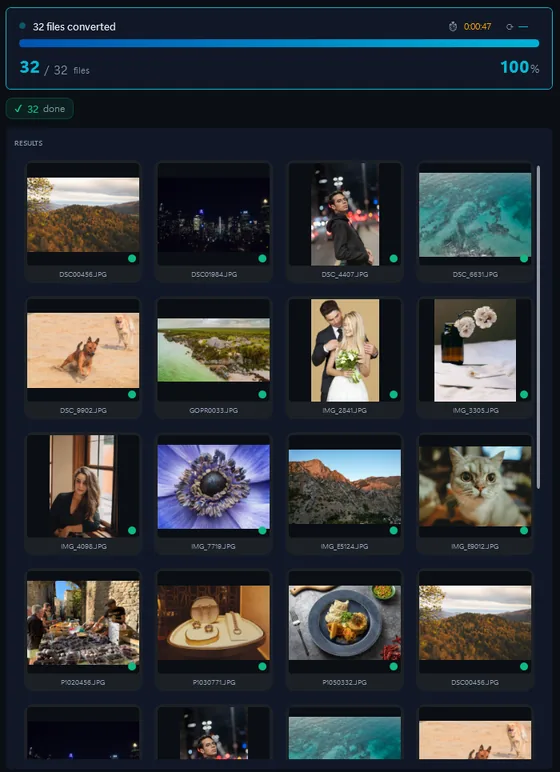
- أضف ملفات PCX الخاصة بكDrop in single files or a whole folder.
- اختر صيغة الإخراجJPG, PNG, TIFF, PDF and more.
- انقر تحويلEvery file converted in one pass.
The same photo, five outputs
 DSC_0001.NEF · 3900×2613
- PNG.png1.9 s16.1 MB
- AVIF.avif2.2 s2.02 MB
- JPG.jpg1.7 s1.69 MB
- WebP.webp1.7 s1.32 MB
- JPEG XL.jxl1.7 s1.12 MB
امتداد PCX هو امتداد مستقل لصورة خطوط المسح المجالى؛ عنوان الملف يخزن المعلومات حول جهاز العرض (دقة الشاشة، عمق اللون، ومعلومات عرض الألوان، أسطح البايت وغيره) بشكل منفصل عن معلومات الصورة الحقيقية، ليسمح بنقل الصورة بشكل سليم وعرضها على أنظمة الكمبيوتر بمختلف مكونات الكمبيوتر. عادة ما تقوم ملفات PCX بتخزين فهرس لألوان الصور تتراوح بين 2-4 لون وحتى 16 لون و256 لون، على الرغم من أن الامتداد تم توسيعه ليسجل صور ذات لون حقيقي (24 بايت) أيضاً.
Optimize file size, keep important metadata, and prepare images for web, print, or long-term archiving in just a few clicks.
صيغة |
PCX |
الشركة |
ZSoft |
| الوصف | امتداد PCX هو امتداد مستقل لصورة خطوط المسح المجالى؛ عنوان الملف يخزن المعلومات حول جهاز العرض (دقة الشاشة، عمق اللون، ومعلومات عرض الألوان، أسطح البايت وغيره) بشكل منفصل عن معلومات الصورة الحقيقية، ليسمح بنقل الصورة بشكل سليم وعرضها على أنظمة الكمبيوتر بمختلف مكونات الكمبيوتر. عادة ما تقوم ملفات PCX بتخزين فهرس لألوان الصور تتراوح بين 2-4 لون وحتى 16 لون و256 لون، على الرغم من أن الامتداد تم توسيعه ليسجل صور ذات لون حقيقي (24 بايت) أيضاً. |
| عوائق | ملفات كبيرة غير مضغوطة. مهملة. |
Ready to convert your PCX files? Download the free trial.
Download the free trial: every file converts, keep 10 cleanشهادات تزكية:
"في حاجة لتحويل هذه الصور اليوم، فإنه من الغوث أن تجد هذا البرنامج. شكراً! "جيسون هوفمان, كاليفورنيا
" التقط صور كل يوم، وأشكركم على هذا المحول الرائع. إنه يوفر وقتي بالفعل"
جيم ريتشاردسون، إنديانابولز
"أود أن أقول أنني كنت أبحث عن محول للصور، ووجدت أن برنامجكم واضح، وبسيط، وجميل جداً. "
براندون كيجان, نيويورك
ضمان الرضا:
 | التحويل الاحترافي للصور ومعالجتها أمر سهل كما ينبغي أن يكون |
|
| موثوق من المصورين والمصممين والشركات حول العالم. |
|
| لا يسبب أخطار على الإطلاق. بعد أن تشتري البرنامج، يكون لديك 30 يوماً ضمان باستعادة المبلغ المدفوع. |
PCX تنظيم الصور
PCX معالجة الصور
Frequently Asked Questions about PCX
What is a PCX image file?
A PCX file is a type of image format used in various tools and workflows. With Contenta Converter PREMIUM you can convert PCX files to more common formats like JPG, PNG, or PDF without losing control over quality.
How do I convert PCX images to JPG?
Install Contenta Converter PREMIUM, add your PCX files to the input list, choose JPG as the output format, and click Convert. The software will process all selected files in a single batch.
Can I batch-process many PCX images at once?
Yes. Contenta Converter PREMIUM is built for batch processing and can handle hundreds or thousands of PCX images in one operation, using all available CPU cores.
When should I convert PCX images to another format?
Convert PCX images when you need better compatibility with web browsers, design tools, or printing services. Exporting to formats like JPG, PNG, or TIFF from Contenta Converter PREMIUM makes sharing and archiving much easier.
Need more than PCX conversion? Browse supported cameras that produce PCX files below, or: