AI Colorize Black & White Photos — Batch Desktop
Bring old B&W photos to life with realistic AI colorization — in batch, on your desktop.
Download the free trial: every file converts, keep 10 clean
Convert the whole folder now. Keep 10 results clean, free. $129 once removes the watermark from the rest. No card, no account, no upload. Windows 10 and 11.
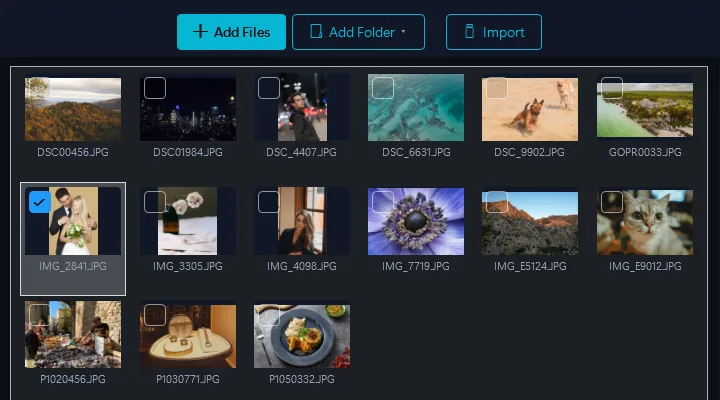
- أضف صوركاسحب وأفلت الملفات أو المجلدات بأكملها
- Select the Colorize B&W presetOne click — AI analyzes each photo and applies realistic, historically accurate colors to clothing, skin, landscapes, and objects.
- تحويلجميع المخرجات جاهزة في دقائق
Powered by Google Gemini AI. Drop an entire album of black & white photos and get realistic, historically accurate colors automatically.
Desktop vs. Cloud Colorization
Cloud Services
- Must upload photos to a server
- $1–3 per image
- One image at a time, slow processing
- Generic results, limited historical accuracy
- Your family photos on third-party servers
Contenta Desktop
- Your own Google Gemini account, not a photo service's servers
- $129 one-time — unlimited images
- Batch colorize an entire album at once
- Google Gemini AI for accurate, natural colors
- Combine with restoration in the same batch
Who Uses AI Colorization?
Family History & Genealogy
See your grandparents wedding photos, WWII-era portraits, and childhood snapshots in vivid color for the first time.
Historical Archives
Bring historical photo collections to life. Make archival images more engaging and accessible to modern audiences.
Education & Research
Help students connect with history. Colorized photos make historical events feel immediate and real.
Publishing & Media
Add color to B&W editorial images, book illustrations, and documentary footage stills for more impactful visual storytelling.
Per-Image Pricing Adds Up Fast
per image on cloud colorization services
per photo, billed by Google to your own Gemini key. Nothing extra from us.
$129 one-time purchase. Google bills your Gemini key a few cents per photo, so a 200-photo album costs about $8 in API fees.
قبل وبعد
قبل Contenta
Upload B&W photos one at a time to cloud services. Pay per image. Wait minutes per photo. Generic color results.
بعد Contenta
Drop an entire B&W album. AI colorizes every photo with realistic, historically accurate colors. All in one batch on your desktop.
ابدأ تحويل صورك اليوم
اختر الخطة المناسبة لك. جميع الخطط تشمل كل الميزات.
No subscription trap. Contenta is a one-time purchase — less than 2 months of Lightroom, and it's yours forever.
الأسئلة الشائعة
يقرأ Contenta أكثر من 100 صيغة إدخال، بما في ذلك JPEG وPNG وTIFF وWebP وHEIC وAVIF وBMP وGIF وPDF وأكثر من 30 صيغة RAW للكاميرات (CR2 وNEF وARW وDNG وRAF وغيرها)، ويكتب 28 صيغة إخراج.
لا يوجد حد. يستخدم Contenta المعالجة متعددة الأنوية لتحويل آلاف الصور في دقائق. يعالج المستخدمون بانتظام أكثر من 10,000 صورة في دفعة واحدة.
نعم. يدعم Contenta أكثر من 30 صيغة RAW من Canon وNikon وSony وFuji وPanasonic وOlympus والمزيد. عناصر التحكم الكاملة في توازن اللون الأبيض وتقليل الضوضاء وضبط الألوان مدمجة.
Every feature, every file and no time limit. Each batch converts in full; results carry a small watermark until you pick up to 10 of them to keep clean. Those picks count once per PC, not per batch, and a batch of 500 costs none until you choose. A license ($129 once) removes the watermark from everything you convert.
لا. Contenta Converter هو شراء لمرة واحدة. تدفع مرة واحدة وتمتلكه للأبد، بما في ذلك جميع التحديثات المستقبلية. بدون رسوم شهرية أو سنوية.
ماذا يقول مستخدمونا
“أستخدم Contenta Converter منذ سنوات وقد وفّر لي ساعات لا تُحصى من العمل. أوصي به بشدة!”
“بسيط وسريع ويفعل بالضبط ما يعد به. المعالجة الدفعية فعّالة بشكل لا يصدق.”
“أفضل محوّل صور وجدته. دعم RAW والتعامل مع البيانات الوصفية من الدرجة الأولى.”
نسخة تجريبية مجانية، ثم $129 مرة واحدة. بدون رسوم شهرية.
Published by ContentaSoft, Umea, Sweden, developer of Contenta Converter PREMIUM.
Contenta Converter PREMIUM is a desktop application for Windows that batch converts, resizes, renames, watermarks, and processes images in 100+ formats including JPEG, PNG, WebP, HEIC, TIFF, RAW, and PDF.
This software contains no adware, spyware, toolbars, or bundled third-party programs. The installer installs only Contenta Converter PREMIUM.
Conversion, resizing, watermarking and metadata editing run on your computer. The optional AI features (background removal, photo restoration, colorize) send the images you process with them to Google Gemini using your own API key. The software does not collect personal data.
Free trial with every feature and no time limit: every file converts, up to 10 results you pick stay clean and the rest carry a watermark. Lifetime license: $129 (one-time payment, no subscription).
How to Uninstall
Open Windows Settings > Apps > Installed apps, find "Contenta Converter PREMIUM" in the list, and click Uninstall. You can also run the uninstaller from the installation folder or use Control Panel > Programs and Features.
Download size: ~2 MB (web installer). Additional components are downloaded during installation (~300 MB total).