أضف علامة مائية لمجلد كامل من الصور قبل مشاركتها - نص أو شعار، في دفعة واحدة
أضف علامة مائية إلى آلاف الصور دفعة واحدة: نص أو شعار، 9 مواضع، وحجم وعتامة من اختيارك.
Download the free trial: every file converts, keep 10 clean
Convert the whole folder now. Keep 10 results clean, free. $129 once removes the watermark from the rest. No card, no account, no upload. Windows 10 and 11.
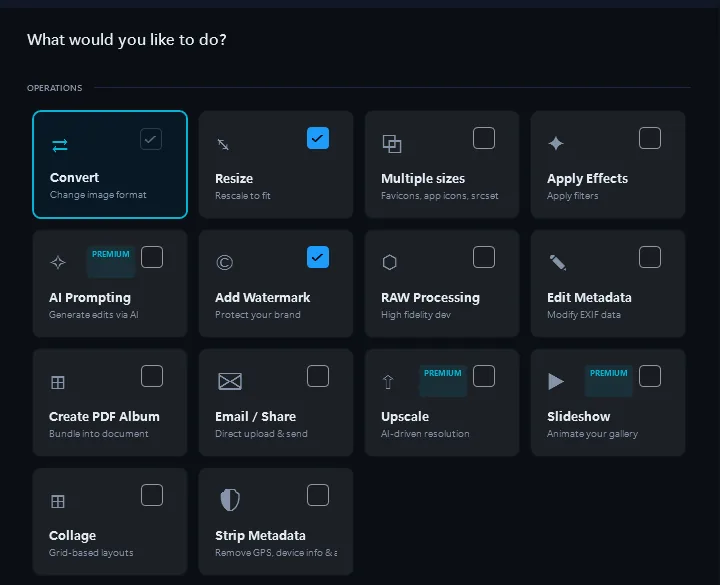
- أضف صوركاسحب وأفلت الملفات أو المجلدات بأكملها
- اضبط العلامة المائيةنص أو شعار، الموضع، الشفافية، الحجم — معاينة قبل التطبيق
- تحويلجميع المخرجات جاهزة في دقائق
احمِ أعمالك قبل مشاركتها. تحصل كل صورة على علامة مائية واحدة: نصك أو شعارك. اختر أحد 9 مواضع، وحجمًا من 5 إلى 100% من عرض الصورة، وعتامة من 0 إلى 100%.
كيف تضيف علامة مائية إلى الصور دفعة واحدة

Windows · free trial · pay once, no subscription
بتعليق صوتي بالإنجليزية مع ترجمة · وقتك ضيق؟ شاهد نسخة الدقيقة الواحدة
خيارات العلامة المائية
علامة مائية نصية
نصك الخاص باللون الذي تختاره، بالحجم والعتامة اللذين تضبطهما. أضف رمز © أو اسمك أو عنوان URL الخاص بك.
طبقة شعار
ضع شعارك بصيغة PNG على كل صورة. يدعم الشفافية لنتائج احترافية.
التحكم في الموضع
شبكة من 9 نقاط: الزوايا الأربع، أو منتصف كل حافة، أو مركز الصورة.
الشفافية والحجم
العتامة من 0 إلى 100%. الحجم من 5 إلى 100% من عرض الصورة، لتحافظ العلامة المائية على النسبة نفسها في أي دقة.
قبل وبعد
قبل Contenta
Open each photo in Photoshop. Add text layer, position it, adjust opacity, flatten, export. Repeat 1,000 times. Hours of repetitive work.
بعد Contenta
Drop 1,000 photos into Contenta. Set your text or logo watermark once: position, size, opacity. Click Convert. Every photo gets the same watermark, with no work per photo.
Who Needs Batch Watermarking?
Photographers
Watermark client proofs before delivery. Protect your work while clients review and select prints.
E-Commerce Sellers
Add your brand logo to all product photos. Prevent competitors from stealing your images.
Real Estate Agents
Add your agency branding to listing photos. Professional look across MLS, Zillow, and your website.
Time You'll Save
hours to manually watermark 1,000 photos
watermark setup, applied to all 1,000 photos in one run
$129 One-Time. Protect Every Photo.
Watermark unlimited photos forever. Text or logo, customizable position and opacity. No per-image fees.
ابدأ تحويل صورك اليوم
اختر الخطة المناسبة لك. جميع الخطط تشمل كل الميزات.
Subscription optional. Buy Contenta once and it's yours forever.
الأسئلة الشائعة
يقرأ Contenta أكثر من 100 صيغة إدخال، بما في ذلك JPEG وPNG وTIFF وWebP وHEIC وAVIF وBMP وGIF وPDF وأكثر من 30 صيغة RAW للكاميرات (CR2 وNEF وARW وDNG وRAF وغيرها)، ويكتب 28 صيغة إخراج.
لا يوجد حد. يستخدم Contenta المعالجة متعددة الأنوية لتحويل آلاف الصور في دقائق. يعالج المستخدمون بانتظام أكثر من 10,000 صورة في دفعة واحدة.
نعم. يدعم Contenta أكثر من 30 صيغة RAW من Canon وNikon وSony وFuji وPanasonic وOlympus والمزيد. عناصر التحكم الكاملة في توازن اللون الأبيض وتقليل الضوضاء وضبط الألوان مدمجة.
Every feature, every file and no time limit. Each batch converts in full; results carry a small watermark until you pick up to 10 of them to keep clean. Those picks count once per PC, not per batch, and a batch of 500 costs none until you choose. A license ($129 once) removes the watermark from everything you convert.
لا. Contenta Converter هو شراء لمرة واحدة. تدفع مرة واحدة وتمتلكه للأبد، بما في ذلك جميع التحديثات المستقبلية. بدون رسوم شهرية أو سنوية.
ماذا يقول مستخدمونا
“أستخدم Contenta Converter منذ سنوات وقد وفّر لي ساعات لا تُحصى من العمل. أوصي به بشدة!”
“بسيط وسريع ويفعل بالضبط ما يعد به. المعالجة الدفعية فعّالة بشكل لا يصدق.”
“أفضل محوّل صور وجدته. دعم RAW والتعامل مع البيانات الوصفية من الدرجة الأولى.”
نسخة تجريبية مجانية، ثم $129 مرة واحدة. بدون رسوم شهرية.
Published by ContentaSoft, Umea, Sweden, developer of Contenta Converter PREMIUM.
Contenta Converter PREMIUM is a desktop application for Windows that batch converts, resizes, renames, watermarks, and processes images in 100+ formats including JPEG, PNG, WebP, HEIC, TIFF, RAW, and PDF.
This software contains no adware, spyware, toolbars, or bundled third-party programs. The installer installs only Contenta Converter PREMIUM.
Conversion, resizing, watermarking and metadata editing run on your computer. The optional AI features (background removal, photo restoration, colorize) send the images you process with them to Google Gemini using your own API key. The software does not collect personal data.
Free trial with every feature and no time limit: every file converts, up to 10 results you pick stay clean and the rest carry a watermark. Lifetime license: $129, one-time payment, or subscribe.
How to Uninstall
Open Windows Settings > Apps > Installed apps, find "Contenta Converter PREMIUM" in the list, and click Uninstall. You can also run the uninstaller from the installation folder or use Control Panel > Programs and Features.
Download size: ~2 MB (web installer). Additional components are downloaded during installation (~190 MB total).