.heic > .jpg
أرسلت 300 صورة عبر AirDrop. نصف تطبيقاتك لا تستطيع فتحها.
HEIC صيغة من Apple. معظم أنظمة Windows ما زالت لا تقرأها. حوّلها دفعيًا إلى JPEG وانتهِ الأمر.
Download the free trial: no time limit, no credit card
Buy once for $129 or subscribe. Free trial, no credit card.
- Windows 11 & Windows 10 desktop app
- Runs offline — photos stay on your PC
- Whole folders in one batch
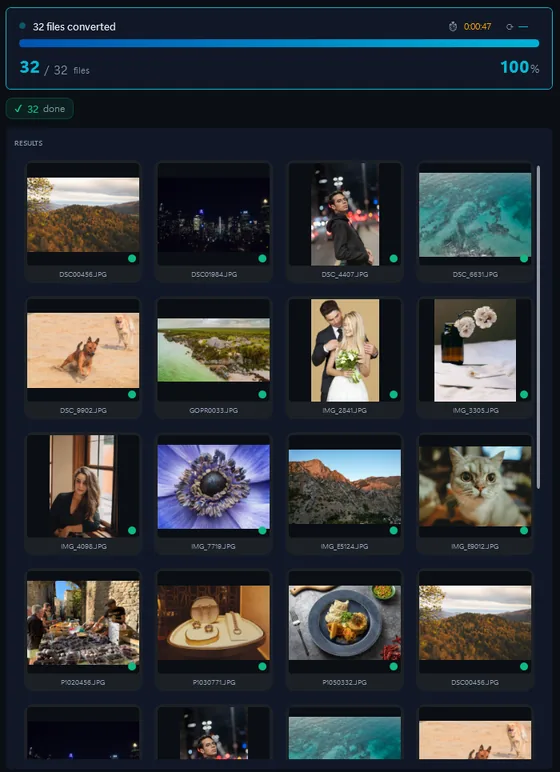
- أضف ملفات HEIC الخاصة بكDrop in single files or a whole folder.
- اختر صيغة الإخراجJPG, PNG, TIFF, PDF and more.
- انقر تحويلEvery file converted in one pass.
تنتقل بيانات EXIF وGPS والاتجاه وملف الألوان مع كل ملف. جودة 92% هي النقطة المثلى - نحو نصف حجم ملف الجودة 100% بدون فرق ملحوظ.
More than 10 photos? Every file converts in the free trial and you keep 10 results clean. To clean the rest: buy once for $129, or subscribe for a short job ($29 per quarter) and cancel any time; it then stops at the end of the period you paid for. Compare both options →
HEIC to JPG: the JPG can be bigger
- sample3.heif2400×1600 · Original526 KB
- JPG at quality 95JPG · 2400×16001.05 MB
- JPG at quality 90JPG · 2400×1600792 KB
- JPG at quality 80JPG · 2400×1600590 KB
- JPG at quality 70JPG · 2400×1600472 KB
- JPG at quality 60JPG · 2400×1600399 KB
تحويل HEIC إلى JPEG على Windows: الدليل الكامل (2026)

Windows · free trial · pay once, no subscription
بتعليق صوتي بالإنجليزية مع ترجمة
Convert HEIC to JPG, PNG, TIFF or PDF
| Output format | Best for |
|---|---|
| JPG (JPEG) | The universal choice — opens on any Windows PC, website, printer or email client. |
| PNG | Lossless copies and anything that needs transparency. |
| TIFF | Archiving and print work that has to stay lossless. |
| Turn a folder of HEIC photos into a PDF document you can send or print. |
Contenta Converter reads 100+ image formats and writes 28, so the same batch also handles RAW, PNG, TIFF and the rest of your library.
Desktop software, not an online converter
Contenta Converter is a Windows program you install on your own PC — Windows 10 and Windows 11. It runs offline, so your photos are never uploaded to anyone's server, and there is no per-file limit and no waiting queue: drop in a folder of 10,000 HEIC files and it works through all of them. Buy once for $129 or subscribe, with a free trial before you buy.
ما هو HEIC؟
HEIC (حاوية الصور عالية الكفاءة) هي صيغة الصور الافتراضية على أجهزة iPhone وiPad منذ iOS 11. تنتج ملفات أصغر من JPEG بجودة مماثلة — لكن معظم برامج Windows والمواقع والطابعات لا يمكنها فتح ملفات HEIC. التحويل إلى JPEG يجعل صورك متوافقة عالميًا.
Do you even need an app for this?
| Photos already on your PC | 500 photos in one go | Nothing uploaded | |
|---|---|---|---|
| Contenta Converter | Yes | Yes | Yes |
| Windows Photos + HEIF extension | Yes | One at a time | Yes |
| iPhone “Most Compatible” setting | New photos only | Nothing to convert | Yes |
| Online converters | Yes | Limits vary | Uploaded to a server |
Why not just use Windows built-in?
Windows 11 can open HEIC — after you install Microsoft's HEIF Image Extension ($0.99). You then get one-at-a-time “Save As JPEG” in the Photos app. If you have more than 10 photos, this is where your afternoon goes.
Why not just change the iPhone setting?
If you turn on “Most Compatible” in iOS Settings → Camera → Formats, new photos save as JPEG. Existing HEIC photos stay HEIC forever. Useful going forward, useless for the 8 years of vacation photos already on your phone.
Why not online converters?
They work for 5 photos. They fall over at 500. And every photo crosses someone else's server — not what you want for a private photo library.
Contenta runs the conversion on every CPU core — 300 photos finish in about 40 seconds on a recent laptop. A typical 4032×3024 iPhone photo: 1.5 MB as HEIC, 3.1 MB as JPEG quality 92.
HEIC questions, straight answers
Will the GPS location of my iPhone photos be preserved?
Yes, unless you tell it not to. EXIF, GPS, orientation, and color profile all carry through by default. There's also a “Strip All Metadata” option if you want the opposite.
Does “Most Compatible” mode on iPhone fix this without an app?
Only for photos taken after you flip the setting. Everything already in your library stays HEIC. That's what batch conversion is for.
What JPEG quality should I pick?
92. Files are about half the size of quality 100 and visually identical except under a magnifier. Drop to 85 for email and web, stay at 92 for archival.
ما الذي يتم الحفاظ عليه
| البيانات الوصفية | محفوظة؟ | التفاصيل |
|---|---|---|
| EXIF | ✓ | إعدادات الكاميرا الكاملة، التاريخ/الوقت، معلومات الجهاز |
| GPS | ✓ | إحداثيات GPS والارتفاع |
| Orientation | ✓ | التدوير التلقائي للوضع العمودي/الأفقي |
| Color Profile | ✓ | ملفات ألوان sRGB وDisplay P3 |
قبل وبعد
قبل Contenta
أرسل ملفات HEIC بالبريد الإلكتروني ونصف مستلميك لا يستطيعون فتحها. حوّل واحدة تلو الأخرى في Preview أو أدوات عبر الإنترنت. افقد البيانات الوصفية في الطريق.
بعد Contenta
أسقط 10,000 ملف HEIC، واحصل على 10,000 ملف JPEG في دقائق. EXIF وGPS والاتجاه كلها سليمة. جاهزة للمشاركة أو الطباعة أو الرفع في أي مكان.
ابدأ تحويل صورك اليوم
اختر الخطة المناسبة لك. جميع الخطط تشمل كل الميزات.
Subscription optional. Buy Contenta once and it's yours forever.
الأسئلة الشائعة
يقرأ Contenta أكثر من 100 صيغة إدخال، بما في ذلك JPEG وPNG وTIFF وWebP وHEIC وAVIF وBMP وGIF وPDF وأكثر من 30 صيغة RAW للكاميرات (CR2 وNEF وARW وDNG وRAF وغيرها)، ويكتب 28 صيغة إخراج.
لا يوجد حد. يستخدم Contenta المعالجة متعددة الأنوية لتحويل آلاف الصور في دقائق. يعالج المستخدمون بانتظام أكثر من 10,000 صورة في دفعة واحدة.
نعم. يدعم Contenta أكثر من 30 صيغة RAW من Canon وNikon وSony وFuji وPanasonic وOlympus والمزيد. عناصر التحكم الكاملة في توازن اللون الأبيض وتقليل الضوضاء وضبط الألوان مدمجة.
Every feature, every file and no time limit. Each batch converts in full; results carry a small watermark until you pick up to 10 of them to keep clean. Those picks count once per PC, not per batch, and a batch of 500 costs none until you choose. A license ($129 once) removes the watermark from everything you convert.
لا. Contenta Converter هو شراء لمرة واحدة. تدفع مرة واحدة وتمتلكه للأبد، بما في ذلك جميع التحديثات المستقبلية. بدون رسوم شهرية أو سنوية.
ماذا يقول مستخدمونا
“أستخدم Contenta Converter منذ سنوات وقد وفّر لي ساعات لا تُحصى من العمل. أوصي به بشدة!”
“بسيط وسريع ويفعل بالضبط ما يعد به. المعالجة الدفعية فعّالة بشكل لا يصدق.”
“أفضل محوّل صور وجدته. دعم RAW والتعامل مع البيانات الوصفية من الدرجة الأولى.”
نسخة تجريبية مجانية، ثم $129 مرة واحدة. بدون رسوم شهرية.
Published by ContentaSoft, Umea, Sweden, developer of Contenta Converter PREMIUM.
Contenta Converter PREMIUM is a desktop application for Windows that batch converts, resizes, renames, watermarks, and processes images in 100+ formats including JPEG, PNG, WebP, HEIC, TIFF, RAW, and PDF.
This software contains no adware, spyware, toolbars, or bundled third-party programs. The installer installs only Contenta Converter PREMIUM.
Conversion, resizing, watermarking and metadata editing run on your computer. The optional AI features (background removal, photo restoration, colorize) send the images you process with them to Google Gemini using your own API key. The software does not collect personal data.
Free trial with every feature and no time limit: every file converts, up to 10 results you pick stay clean and the rest carry a watermark. Lifetime license: $129, one-time payment, or subscribe.
How to Uninstall
Open Windows Settings > Apps > Installed apps, find "Contenta Converter PREMIUM" in the list, and click Uninstall. You can also run the uninstaller from the installation folder or use Control Panel > Programs and Features.
Download size: ~2 MB (web installer). Additional components are downloaded during installation (~190 MB total).