Shopify
Shopify Image Optimization
Batch resize and compress product photos for your Shopify store
Download the free trial: every file converts, keep 10 clean
Convert the whole folder now. Keep 10 results clean, free. $129 once removes the watermark from the rest. No card, no account, no upload. Windows 10 and 11.
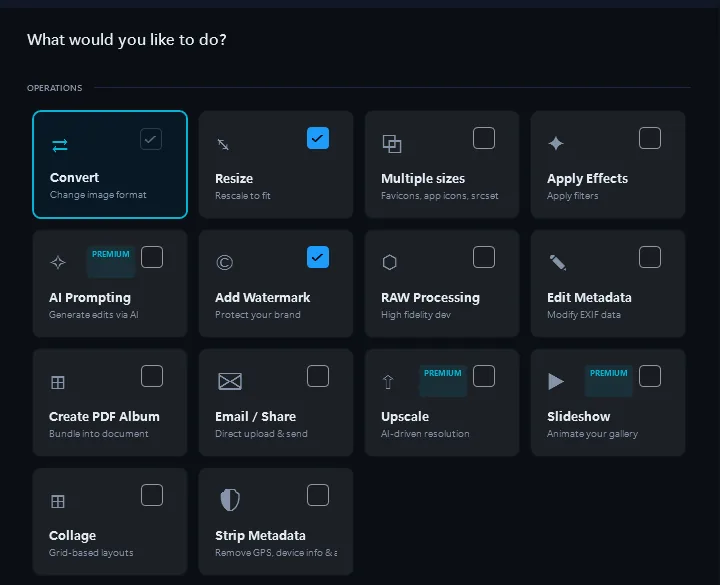
- Import product photosDrag and drop your product photography from any source.
- Set the sizeType 2048 × 2048 px for product photos and pick JPG or WebP.
- Batch export optimized imagesAll products resized, compressed, and ready for upload.
Optimize images for Shopify CDN. Batch resize to recommended dimensions, convert to WebP, compress for fast page loads.
Optimize for Shopify Performance
Resize to Shopify recommended dimensions for fastest page loads.
Convert to WebP for 30-50% smaller files with identical quality.
Compress hundreds of images while maintaining visual quality.
Preserve and manage image metadata for SEO alt text.
قبل وبعد
قبل Contenta
Uploading unoptimized 5MB images that slow your store to a crawl.
بعد Contenta
Fast-loading 200KB WebP images. Better Core Web Vitals, more sales.
Simple, One-Time Pricing
ابدأ تحويل صورك اليوم
اختر الخطة المناسبة لك. جميع الخطط تشمل كل الميزات.
Subscription optional. Buy Contenta once and it's yours forever.
ماذا يقول مستخدمونا
“أستخدم Contenta Converter منذ سنوات وقد وفّر لي ساعات لا تُحصى من العمل. أوصي به بشدة!”
“بسيط وسريع ويفعل بالضبط ما يعد به. المعالجة الدفعية فعّالة بشكل لا يصدق.”
“أفضل محوّل صور وجدته. دعم RAW والتعامل مع البيانات الوصفية من الدرجة الأولى.”
Published by ContentaSoft, Umea, Sweden, developer of Contenta Converter PREMIUM.
Contenta Converter PREMIUM is a desktop application for Windows that batch converts, resizes, renames, watermarks, and processes images in 100+ formats including JPEG, PNG, WebP, HEIC, TIFF, RAW, and PDF.
This software contains no adware, spyware, toolbars, or bundled third-party programs. The installer installs only Contenta Converter PREMIUM.
Conversion, resizing, watermarking and metadata editing run on your computer. The optional AI features (background removal, photo restoration, colorize) send the images you process with them to Google Gemini using your own API key. The software does not collect personal data.
Free trial with every feature and no time limit: every file converts, up to 10 results you pick stay clean and the rest carry a watermark. Lifetime license: $129, one-time payment, or subscribe.
How to Uninstall
Open Windows Settings > Apps > Installed apps, find "Contenta Converter PREMIUM" in the list, and click Uninstall. You can also run the uninstaller from the installation folder or use Control Panel > Programs and Features.
Download size: ~2 MB (web installer). Additional components are downloaded during installation (~190 MB total).