CONTENTA CONVERTER PREMIUM
Convert, Resize, Upscale, Watermark — All in One Batch
50+ formats, AI upscaling, 35+ effects, watermarking, RAW processing, metadata control, CLI & automation — process thousands of photos in minutes. No subscription.
Try Free for 30 Days - No Credit Card Required
★★★★★
Trusted by 100,000+ photographers worldwide
v9.0
Please note that Contenta Software programs do not allow you to copy protected material. You may use this software in copying material in which you own the copyright or have obtained permission to copy from the copyright owner.
Intel and Core 2 Duo are registered trademarks of Intel Corporation. AMD and Athlon X2 are registered trademarks of Advanced Micro Devices, Inc. Windows 10/8/7/XP/2003/Vista are registered trademarks of Microsoft Corporation. Mac Os X is a registered trademarks of Apple, Inc. All other trademarks are the property of their respective owners.
The free trial is limited to 30 days. The images or documents generated by the trial version are watermarked. After payment, the time and watermark limitations are removed.
Windows 11, 10 (64 bit)
- Optimized for multi-core processors
- 512 MB RAM
- 60 MB free disk space
Published by ContentaSoft, Umea, Sweden — developer of Contenta Converter PREMIUM.
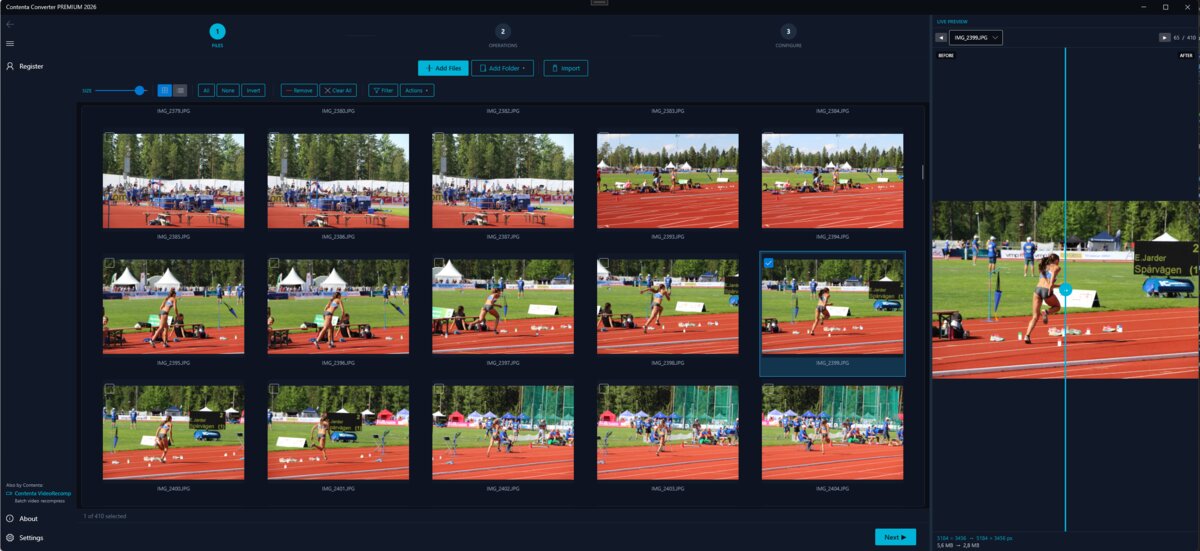
Contenta Converter PREMIUM is a desktop application for Windows that batch converts, resizes, renames, watermarks, and processes images in 60+ formats including JPEG, PNG, WebP, HEIC, TIFF, RAW, and PDF.
This software contains no adware, spyware, toolbars, or bundled third-party programs. The installer installs only Contenta Converter PREMIUM.
All images are processed locally on your computer. No files are uploaded to any server. The software does not collect personal data.
Free 30-day trial with full functionality. After the trial, a license key is required. Lifetime license: $129 (one-time payment, no subscription).
How to Uninstall
Open Windows Settings > Apps > Installed apps, find "Contenta Converter PREMIUM" in the list, and click Uninstall. You can also run the uninstaller from the installation folder or use Control Panel > Programs and Features.
Download size: ~2 MB (web installer). Additional components are downloaded during installation (~150 MB total).
Privacy policy |
Terms Of Use
 Download for Windows