
.dng

Work faster with DNG image files

Open, convert, and recompress DNG images to modern formats like JPG, PNG, WEBP, and PDF. Contenta Converter PREMIUM processes entire folders at once and keeps your metadata intact when you need it.

Download free trial — convert DNG now See all features →

$129 one-time. No subscription, no per-image fees.

  • Free trial, no time limit
  • Keep 10 results clean
  • Windows 10/11
  • Works offline
  • 100,000+ users worldwide
Before
RAF

DSCF0014.RAF

15.2 MB

Camera RAW: large, hard to share
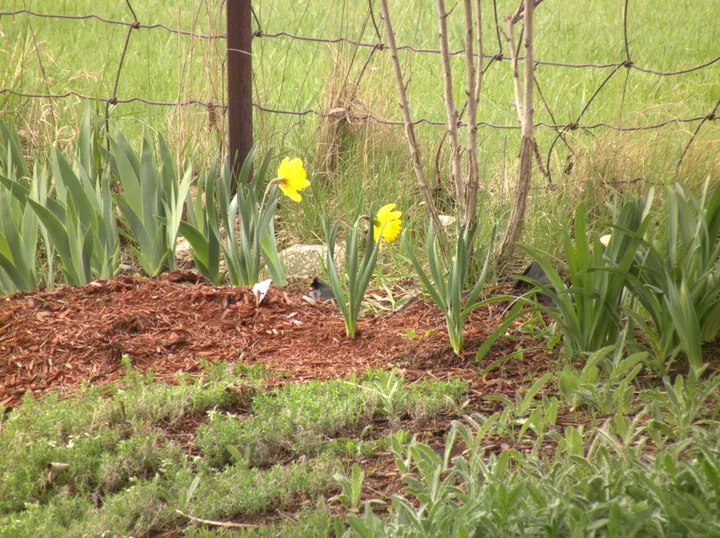
AfterDaffodils in a garden bed: the JPG Contenta Converter made from a Fujifilm RAF file

DSCF0014.jpg

2.8 MB · 3664×2742 · 0.6 s

JPG: opens everywhere

Real output from Contenta Converter: one Fujifilm RAF file of 15.2 MB became a 3664 x 2742 JPG of 2.8 MB in 0.6 seconds on a desktop PC.
  1. Download the trial and install it on Windows 10 or 11.
  2. Drop your DNG files, or a whole folder, into Contenta Converter.
  3. Pick JPG, PNG, TIFF or PDF and click “Start Converting”.

Inside one RAW file

DSC_0001.NEF9,454,032 B
JPG · 3900×2613 · 1.69 MB. Contenta decodes the sensor data and writes a new JPG. The camera and exposure tags come along (Nikon D60, ISO 400, 1/125 s, f/2.8, 86 mm).
One Nikon D60 NEF, read with ExifTool. Each block is drawn to its real byte size. Other cameras lay files out differently; this is one real file, not an average.
CR2 | JPG | DNG | THM | TIF | RAW | TIFF | JPEG | NEF | PSD | EPS | JP2 | BMP | RAF | PNG | GIF | CRW | JPS | SR2 | DCR | PDF | XCF | WEBP | JPX | WBMP | ARW | RW2 | CR3 | HEIC | MPO | JPF |

Canon Photos — Convert, Resize & Organize

格式詳情: DNG

格式 DNG
公司 Adobe
說明 數碼底片 (DNG) 文件格式是Adobe Systems所設計的一個免版稅RAW圖像格式。
優點 這個格式是Adobe為了回應用戶要求而設計的一個統一的相機RAW文件格式。數碼底片基於TIFF/EP格式,而原數據的使用是強制性的。
缺點 文件的大小非常大。沒有很多軟件能夠處理。
元數據 處理XMP, EXIF 或 IPTC
60+
Image Formats
100K+
Happy Users
35+
Effects & Filters

使用者證明:

“I have been using Contenta Converter for years and it has saved me countless hours of work. Highly recommended!”

“Simple, fast, and does exactly what it promises. The batch processing is incredibly efficient.”

“Best image converter I have found. The RAW support and metadata handling are top-notch.”

Trusted by 100,000+ users worldwide
Contenta Converter PREMIUM Windows

保證滿意:

簡單又專業的照片轉換以及處理過程
攝影師(業余和專業),設計工作室,建築師,大機構(NASA,IBM,克萊斯勒,大學醫院)所使用的產品。
完全無風險. 購買後,您將獲得一個30天退款保證,絕不多問。

Other cameras from this brand

Canon EOS 5D Mark III Canon EOS Rebel T8i Canon Canikon Canon EOS 7D Canon EOS 5D Mark II Canon EOS R6 Canon EOS 60D Canon EOS R5 Canon EOS 6D Canon EOS 7D Mark II Canon EOS 5D Canon EOS 70D Canon EOS Rebel T6 Canon EOS 1300D Canon EOS REBEL T2i Canon EOS M50 Canon EOS R Canon EOS 5D Mark IV Canon EOS-1D Mark II N Canon EOS 50D Canon p Canon EOS 30D Canon EOS-1Ds Mark III Canon EOS-1D Mark III Canon EOS 80D Canon EOS 600D Canon EOS 90D Canon 5DIII_N2 Canon EOS REBEL T4i Canon EOS REBEL T3 Canon EOS 550D Canon EOS Rebel SL3 Canon EOS 450D Canon EOS 700D Canon EOS 350D DIGITAL Canon EOS 650D Canon EOS 6D Mark II Canon EOS Kiss X6i Canon EOS 1100D Canon EOS REBEL T3i Canon EOS-1D X Canon EOS DIGITAL REBEL XTi Canon EOS REBEL T1i Canon EOS DIGITAL REBEL XS Canon EOS 250D Canon DIGITAL IXUS 100 IS Canon EOS REBEL T5i Canon PowerShot S110 Canon EOS R10 Canon EOS 750D Canon EOS RP Canon EOS 40D Canon EOS 1200D Canon EOS REBEL T5 Canon EOS R8 Canon EOS 1000D Canon EOS-1D Mark II Canon EOS REBEL SL1 Canon EOS-1D Mark IV Canon EOS M6 Canon EOS DIGITAL REBEL XSi Canon EOS Rebel T7 Canon EOS 500D Canon EOS 800D Canon EOS Rebel T6i Canon EOS M Canon EOS Kiss X4 Canon EOS PHR Canon EOS 10D Canon PowerShot A610 Canon EOS R7 Canon EOS 850D Canon EOS 100D Canon EOS 20D Canon PowerShot S95 Canon PowerShot SX50 HS Canon PowerShot SX130 IS Canon EOS 2000D Canon EOS Kiss X2 Canon EOS M3 Canon PowerShot SX100 IS Canon EOS DIGITAL REBEL XT Canon PowerShot SX1 IS Canon EOS 77D Canon EOS-1D Canon PowerShot SD950 IS Canon PowerShot D10 Canon PowerShot S3 IS Canon PowerShot G12 Canon PowerShot G7 Canon EOS DIGITAL REBEL Canon EOS Rebel T100 Canon PowerShot SX30 IS Canon PowerShot G1 X Canon EOS 4000D Canon PowerShot SX40 HS Canon PowerShot A1200 Canon PowerShot A590 IS Canon PowerShot SX210 IS Canon PowerShot SX230 HS Canon PowerShot A720 IS Canon EOS R5m2 Canon EOS 200D Canon PowerShot G11 Canon DIGITAL IXUS 75 Canon EOS-1Ds Mark II Canon PowerShot G9 Canon PowerShot S90 Canon EOS-1DS Canon EOS 400D DIGITAL Canon DIGITAL IXUS 70 Canon EOS-1D X Mark II Canon PowerShot A470 Canon PowerShot A1300 Canon PowerShot A710 IS Canon PowerShot G7 X Mark II Canon PowerShot S5 IS Canon PowerShot SX220 HS Canon PowerShot SX260 HS Canon 9000F Canon EOS R6m2 Canon PowerShot A630 Canon PowerShot SX120 IS Canon PowerShot SX150 IS Canon PowerShot SX160 IS Canon PowerShot SX500 IS Canon IXUS 220HS Canon PowerShot A570 IS Canon 8600F Canon EOS Kiss X5 Canon PowerShot A650 IS Canon PowerShot A800 Canon PowerShot G10 Canon PowerShot S100 Canon PowerShot SD870 IS Canon DIGITAL IXUS 80 IS Canon EOS 5DS R Canon EOS Kiss Digital N Canon EOS Kiss Digital X Canon EOS Kiss X3 Canon EOS M6 Mark II Canon EOS R50 Canon EOS Rebel SL2 Canon IXUS 115 HS Canon PowerShot A460 Canon PowerShot A495 Canon PowerShot A810 Canon PowerShot D20 Canon PowerShot G15 Canon PowerShot G16 Canon PowerShot SD780 IS Canon PowerShot SX20 IS Canon LiDE 20

Frequently Asked Questions

What image formats does the Canon produce?

The Canon produces DNG files. You can convert these to JPG, TIFF, PNG, PDF, WEBP, and many other formats using Contenta Converter PREMIUM.

How do I convert Canon photos?

Download Contenta Converter PREMIUM, drag and drop your photos, choose the output format, and click Convert. It supports batch conversion of hundreds of files at once.

Does Contenta Converter support RAW files and metadata?

Yes. Contenta Converter PREMIUM reads RAW files from most popular camera brands and can preserve or update IPTC/XMP metadata such as copyright, location, and descriptions during conversion.

Can I add a watermark to my Canon photos?

You can add text or image watermarks to all your photos in one step. Contenta Converter PREMIUM lets you choose position, opacity, and size so your branding looks consistent on every export.

Is Contenta Converter free to try?

Yes. The trial has every feature and no time limit. Pick up to 10 results to keep clean; the rest carry a small watermark. Buying a license removes the watermark.

Ready to convert your photos? Download Free Trial